
Are you looking to boost your sound system without breaking the bank? Connecting speakers in parallel is a simple trick that can make your audio experience louder and fuller.
But if you’re unsure how to do it safely and correctly, you might risk damaging your equipment. Don’t worry—this guide will walk you through each step clearly, so you can confidently set up your speakers and enjoy richer sound. Keep reading to discover how easy it is to connect your speakers in parallel and take your music to the next level.
Benefits Of Parallel Speaker Wiring
Wiring speakers in parallel has clear benefits for your audio setup. It changes how electrical current flows through the system, which affects sound and equipment safety.
Choosing parallel wiring can improve speaker performance and protect your amplifier. It also makes adding more speakers easier without complex adjustments.
Better Sound Distribution
Parallel wiring helps spread sound evenly across all speakers. Each speaker gets the same voltage, which keeps the volume balanced. This setup avoids weak or loud spots in the listening area.
Maintains Safe Impedance Levels
Connecting speakers in parallel lowers the total impedance. This matches well with many amplifiers, preventing overload. Keeping impedance in range protects your audio gear from damage.
Easier To Add More Speakers
Adding speakers is simple with parallel wiring. Each new speaker connects directly to the power source. This method avoids complicated rewiring and keeps the system stable.
Consistent Power Across Speakers
Parallel wiring sends equal power to each speaker. This ensures all speakers perform at their best. It helps maintain clear and strong sound quality throughout.
Required Tools And Materials
To connect speakers in parallel, gather the right tools and materials first. These items help create a safe and clear audio setup. Using proper tools makes the process easier and avoids damage.
Having all materials ready saves time and ensures a smooth connection. Each tool plays a key role in wiring and securing the speakers properly. Below are the essential tools and materials needed for this task.
Speaker Wire
Choose good quality speaker wire. It should have enough length to reach all speakers. The wire thickness depends on the distance and power needs. Thicker wire reduces sound loss over long runs.
Wire Stripper
A wire stripper removes insulation from the ends of wires. It exposes the metal for a clean connection. Using this tool prevents damage to the wires and ensures a solid contact.
Screwdriver
Screwdrivers tighten terminals on speakers and amplifiers. A flathead or Phillips type works for most connectors. Tight connections stop wires from coming loose and causing sound issues.
Electrical Tape Or Heat Shrink Tubing
Wrap connections with electrical tape or use heat shrink tubing. This protects wires from short circuits and moisture. It also keeps the setup neat and safe from accidental pulls.
Multimeter (optional)
A multimeter checks wire continuity and speaker impedance. It helps verify correct wiring and avoids damage. Testing connections before powering up ensures everything works well.
Speaker Compatibility And Impedance
Understanding speaker compatibility and impedance is key to connecting speakers in parallel safely. Impedance affects how much load the amplifier handles. Matching speakers with the right impedance protects your audio system. It ensures clear sound without damage. This section covers essential tips on speaker impedance and amplifier load.
Matching Speaker Impedance
Each speaker has an impedance rating, usually measured in ohms. Common values are 4, 6, or 8 ohms. When connecting speakers in parallel, the total impedance drops. For example, two 8-ohm speakers in parallel become 4 ohms.
Keep the combined impedance within your amplifier’s limits. Avoid mixing speakers with very different impedances. Different ratings can cause uneven sound and stress the amplifier. Use speakers with the same or similar impedance for best results.
Amplifier Load Considerations
Your amplifier can only handle a certain load. This load is the impedance of the connected speakers. If the total impedance is too low, the amplifier may overheat or shut down. It can also cause permanent damage.
Check the amplifier’s specifications before connecting speakers. Most amplifiers list the minimum safe impedance. Make sure the parallel connection stays above this limit. Proper load management ensures long life and good sound quality.
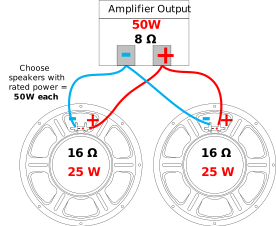
Credit: www.amplifiedparts.com
Preparing Speakers For Connection
Preparing speakers for connection ensures a safe and clear sound setup. Proper preparation helps avoid damage and poor sound quality. It involves checking terminals and handling wires correctly. Follow simple steps to get your speakers ready for parallel connection.
Inspecting Speaker Terminals
Start by examining speaker terminals closely. Look for any dirt, rust, or damage. Clean terminals if they appear dirty. Use a dry cloth or a soft brush. Check if the terminals are tight and secure. Loose terminals can cause poor connections. Tighten them gently if needed. Make sure terminals match your wire connectors. Proper contact improves sound quality and safety.
Stripping And Twisting Wires
Strip the wire ends carefully to expose copper. Remove about half an inch of insulation. Avoid cutting the wire strands. Exposed wires should be neat and uniform. Twist the copper strands tightly together. Twisting prevents fraying and improves connection. Keep the wire ends clean and ready. This step ensures good contact with the terminals.
Step-by-step Parallel Wiring Process
Connecting speakers in parallel is a common method to increase sound output. It helps keep the impedance low and allows multiple speakers to work together. This step-by-step process makes wiring simple and safe. Follow each step carefully to avoid mistakes. Use the right tools and check each connection twice.
Connecting Positive Terminals
Start by identifying the positive terminals on each speaker. Usually, these are marked with a plus sign or red color. Take a wire and connect the positive terminal of the first speaker to the positive terminal of the second speaker. Use a clean cut wire for a better fit. Make sure the wire is tightly connected to avoid loose contact. Repeat this for all speakers you want to connect in parallel.
Connecting Negative Terminals
Next, locate the negative terminals on each speaker. They are often marked with a minus sign or black color. Use another wire to connect the negative terminal of the first speaker to the negative terminal of the second speaker. Ensure the wire is secure and fits well. Keep the negative connections separate from the positive wires to prevent short circuits. Connect all negative terminals in the same way.
Securing Connections
After wiring the terminals, check all connections carefully. Use electrical tape or wire connectors to cover exposed wires. This prevents accidental shorts and keeps connections stable. Avoid loose wires by twisting and tightening them firmly. Place the wires neatly to avoid tangling. Finally, test your speakers to confirm all connections work properly.
Credit: www.audiovolt.co.uk
Testing The Speaker Setup
Testing the speaker setup is a key step after connecting speakers in parallel. It confirms the wiring works and the sound is clear. Proper testing helps avoid damage to your equipment and ensures the best audio experience. Follow these simple methods to check your setup before full use.
Using A Multimeter
A multimeter checks the electrical connections between speakers. Set it to measure resistance (ohms). Touch the probes to the speaker terminals. The reading shows if the speakers are connected correctly.
In parallel wiring, the total resistance decreases. Make sure the meter shows the expected lower resistance. If the reading is too high or infinite, check for loose wires or broken connections.
Playing Test Audio
Play a test audio track to hear the speakers’ performance. Use a simple sound file with different tones. Listen for clear, balanced sound from all speakers.
Check each speaker separately by adjusting the balance or volume. If any speaker sounds weak or distorted, recheck the wiring. Testing with audio confirms the speakers work well together in parallel.
Troubleshooting Common Issues
Troubleshooting common issues helps keep your speaker setup working well. Simple problems can stop your sound from playing clearly. Checking these problems saves time and frustration.
Distorted Sound
Distorted sound often means the speakers are overloaded. Check if the volume is too high on the amplifier or source. Lower the volume to see if the sound clears up.
Another cause is loose or poor wire connections. Make sure all wires are firmly attached. Use good quality cables for better sound quality.
Sometimes, using speakers with different power ratings causes distortion. Match the speakers to the amplifier’s power output to avoid damage.
No Audio Output
No audio output usually means a wiring error. Double-check that all wires connect to the correct terminals. Confirm positive and negative wires are matched on all speakers.
Test the amplifier or audio source to ensure it is working properly. Try another audio source or device to isolate the problem.
Blown speakers can cause no sound. Inspect each speaker for damage. Replace any faulty speakers to restore sound.
Safety Tips For Wiring Speakers
Wiring speakers in parallel can improve sound and increase power output. Safety is important to avoid damage or injury. Following basic safety tips protects your equipment and yourself.
Always check the equipment and environment before starting. Use the right tools and materials. Pay attention to wire connections and insulation. These steps ensure a safe and effective setup.
Use Proper Wire Gauge
Choose speaker wire with the correct thickness. Thin wires can overheat and cause shorts. The right gauge supports the current without risk. Thicker wires work better for longer distances.
Turn Off Power Before Wiring
Always switch off the amplifier or receiver first. Working with live electricity can cause shocks or damage. Confirm power is off by testing or unplugging devices. Safety first saves trouble later.
Secure All Connections
Make sure all wire ends are tightly connected. Loose wires can create sparks or noise. Use wire strippers to expose the wire cleanly. Twist strands and attach firmly to terminals.
Check For Short Circuits
Inspect wires for any exposed or touching parts. Touching wires can short circuit the system. Use electrical tape or heat shrink tubing to cover bare wires. Keep wires separated and organized.
Use Quality Materials
Buy wires and connectors from trusted brands. Low-quality parts may fail or cause problems. Good materials last longer and improve sound quality. Invest in what keeps your system safe.

Credit: www.youtube.com
Frequently Asked Questions
What Does Connecting Speakers In Parallel Mean?
Connecting speakers in parallel means wiring multiple speakers where all positive terminals connect together. All negative terminals also connect together, creating one shared circuit.
How Does Parallel Connection Affect Speaker Impedance?
Parallel wiring decreases the total impedance. The total impedance is less than the smallest speaker impedance, affecting amplifier load and performance.
Can I Connect Different Speaker Impedances In Parallel?
Yes, but it changes total impedance unpredictably. Mixing impedances can overload the amplifier or reduce sound quality.
What Are The Advantages Of Parallel Speaker Connections?
Parallel connections allow multiple speakers to share one amplifier channel. This setup can increase volume and distribute sound evenly.
Conclusion
Connecting speakers in parallel is simple and effective. This method keeps sound strong and clear. Always check the speaker’s impedance to avoid damage. Use correct wiring to ensure safety and good sound. Double-check connections before turning on your system. Experiment with different setups to find what works best.
Enjoy better audio with your new parallel speaker setup. Keep practicing, and soon it will feel easy. Sound quality and volume improve with proper connections. Try it yourself and hear the difference today.
As an Amazon Associate, I earn from qualifying purchases.

