Are you struggling to connect your JLab earbuds to your device? You’re not alone.
Sometimes, even the simplest tech can feel tricky. But don’t worry—connecting your JLab earbuds is easier than you think. In this guide, you’ll learn step-by-step how to get your earbuds paired quickly and without frustration. Once you master this, you’ll enjoy your music, calls, and podcasts with crystal-clear sound anytime you want.
Keep reading, and you’ll be connected in no time!

Credit: www.youtube.com
Preparing Your Jlab Earbuds
Preparing your Jlab earbuds is the first step to enjoy clear sound and smooth connection. This section guides you through simple actions. These steps help your earbuds work properly and pair easily with devices.
Charging The Earbuds
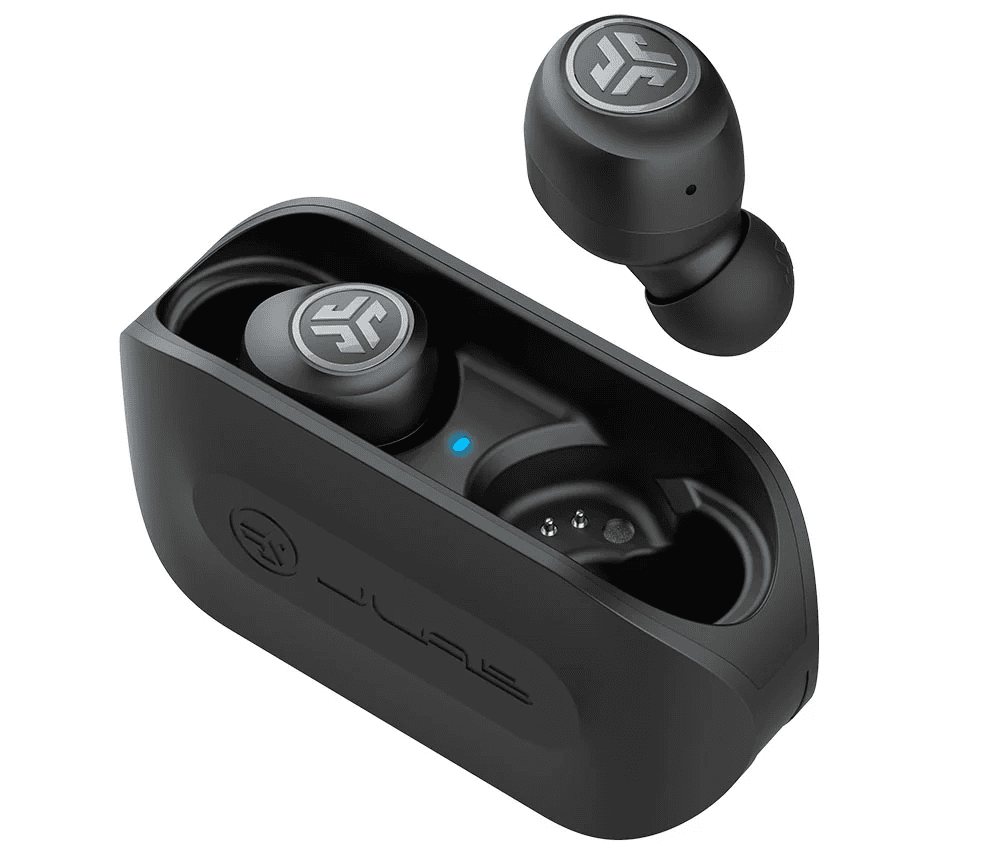
Start by charging your Jlab earbuds fully. Place them in the charging case. Make sure the case has power. The earbuds show a light when charging. A full charge takes about 1 to 2 hours. Charged earbuds last longer and connect better.
Checking Compatibility
Check if your device supports Bluetooth. Jlab earbuds work with most smartphones, tablets, and laptops. Ensure your device’s Bluetooth is turned on. Older devices might not connect well. Using a compatible device avoids connection problems.
Resetting The Earbuds
Resetting solves many connection issues. Put the earbuds in the charging case. Hold the reset button or follow model-specific steps. This clears previous pairings and errors. After reset, earbuds are ready to pair fresh.
Credit: www.esseg.eu
Pairing With Your Device
Pairing your JLab earbuds with a device is simple and quick. This process lets you enjoy wireless sound without hassle. Follow these clear steps to connect your earbuds properly. Each step ensures your earbuds link smoothly to your phone, tablet, or computer.
Turning On Bluetooth
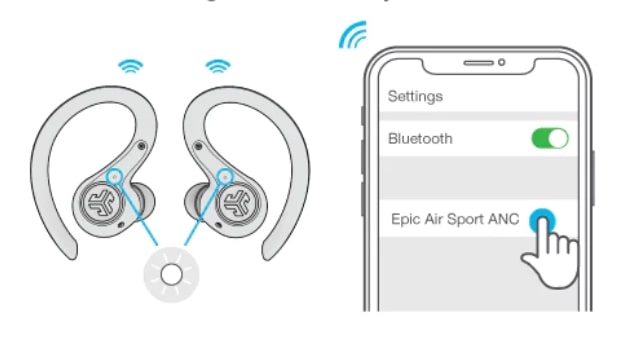
Start by turning on Bluetooth on your device. Open the settings menu and find the Bluetooth option. Tap the switch to activate Bluetooth. Your device will begin searching for nearby devices automatically.
Activating Pairing Mode
Next, put your JLab earbuds into pairing mode. Take the earbuds out of the case. Press and hold the power button until the LED light flashes. This flashing indicates the earbuds are ready to connect.
Selecting Jlab Earbuds
Look at your device’s list of available Bluetooth devices. Find the name that matches your JLab earbuds model. Tap the name to connect. Once connected, the LED light will stop flashing and stay on briefly.
Troubleshooting Connection Issues
Connection issues with JLab earbuds can be frustrating. They stop you from enjoying your music or calls clearly. This section helps you fix common problems quickly. Follow these easy steps to get your earbuds working again.
Common Pairing Problems
Sometimes, earbuds do not connect to your device. This happens if the earbuds are not in pairing mode. Make sure the earbuds are fully charged. Turn off Bluetooth on other devices nearby. Restart Bluetooth on your phone or tablet. Try pairing again by holding the button on the earbuds until the light blinks.
Fixing Audio Dropouts
Audio dropouts mean the sound cuts in and out. This can happen if you are too far from your device. Keep the earbuds close, within 10 meters. Avoid walls or objects blocking the signal. Turn off other Bluetooth devices that might interfere. Restart your earbuds and device to refresh the connection.
Reconnecting After Disconnection
If earbuds disconnect suddenly, reconnecting is simple. Turn Bluetooth off and on again on your device. Place the earbuds back in their case, close it, then take them out. This resets the earbuds and helps them reconnect. Select the earbuds from your device’s Bluetooth list to connect again. Repeat if needed until connection is stable.
Credit: www.esseg.eu
Using Jlab Earbuds Features
Using Jlab earbuds features enhances your listening experience. These earbuds offer easy controls and customizable options. Understanding these features helps you get the most from your device.
Controlling Playback
Jlab earbuds let you control music without touching your phone. Tap the earbuds to play or pause songs. Double-tap to skip to the next track. Triple-tap goes back to the previous song. Press and hold to adjust volume quickly. These controls make listening simple and hands-free.
Managing Calls
Answer calls by tapping the earbuds once. To end a call, tap again. Reject calls by pressing and holding for two seconds. Use the built-in microphone for clear conversations. These earbuds help you stay connected without using your phone.
Customizing Settings
Download the Jlab app to customize your earbuds. Change sound modes like bass boost or balanced audio. Adjust touch controls to match your preferences. Update firmware for better performance. These settings let you tailor your earbuds to your needs.
Maintaining Your Jlab Earbuds
Maintaining your Jlab earbuds helps keep them working well for a long time. Simple care steps protect the earbuds from damage. Clean earbuds sound better and last longer. Battery health affects how long you can enjoy your music. Regular updates improve performance and fix bugs. Follow these tips to keep your earbuds in top shape.
Cleaning Tips
Use a soft, dry cloth to wipe the earbuds. Avoid using water or harsh chemicals. Clean the ear tips gently to remove earwax. Use a small brush to clean the charging contacts. Keep the earbuds dry at all times. Store them in the case after use to prevent dust.
Battery Care
Charge the earbuds fully before first use. Avoid letting the battery drop to zero often. Use the original charger or a compatible one. Do not overcharge; unplug once fully charged. Keep earbuds in a cool, dry place. Extreme heat or cold can damage the battery.
Firmware Updates
Check for updates regularly using the Jlab app. Updates can fix bugs and improve sound quality. Connect earbuds to your device before updating. Follow the on-screen instructions carefully. Do not disconnect earbuds during the update. Keep your earbuds updated for the best experience.
Frequently Asked Questions
How Do I Pair Jlab Earbuds With My Phone?
Turn on your Jlab earbuds and enable Bluetooth on your phone. Select “Jlab” from the device list to connect. Wait for the confirmation sound indicating a successful pairing.
Why Won’t My Jlab Earbuds Connect To Bluetooth?
Ensure your earbuds are in pairing mode and your device’s Bluetooth is on. Restart both devices and try reconnecting. Update your device’s software if issues persist.
Can I Connect Jlab Earbuds To Multiple Devices?
Jlab earbuds can connect to one device at a time. To switch devices, disconnect from the current one and pair with the new device.
How Do I Reset My Jlab Earbuds Connection?
Hold the earbuds’ power button for 10 seconds until the LED flashes. This resets the earbuds, clearing previous pairings and fixing connection issues.
Conclusion
Connecting to JLab earbuds is quick and simple. Just follow the steps carefully. Make sure your earbuds are charged and in pairing mode. Open your device’s Bluetooth settings and select the JLab earbuds. Once connected, enjoy clear sound for calls or music.
Keep your earbuds close to your device for a stable connection. These easy tips will help you stay connected without trouble. Now, you can enjoy your JLab earbuds anytime, anywhere. Simple, fast, and reliable.
As an Amazon Associate, I earn from qualifying purchases.