Are your earbuds not loud enough, even when you turn the volume all the way up? It can be really frustrating when your favorite songs or podcasts sound too quiet, especially in noisy places.
But don’t worry—you don’t have to buy new earbuds right away. There are simple tricks you can use to make your earbuds louder and improve your listening experience instantly. Keep reading, and you’ll discover easy, effective steps that will bring your music to life like never before.
Check Device Volume Settings
Checking your device volume settings is the first step to make earbuds louder. Many times, low sound is due to device settings, not the earbuds. Adjusting these settings can boost audio clearly and safely.
Adjust System Volume
Start by increasing the main volume on your device. Use the physical buttons or on-screen controls to raise the sound level. Make sure the volume is not muted or set too low. Check the volume for media, calls, and notifications separately. Each might have different levels that affect your earbuds.
Use Volume Boost Features
Some devices offer volume boost options in settings. These features enhance sound beyond normal limits. Look for options like “Volume Booster,” “Equalizer,” or “Sound Enhancer.” Turn these on to increase loudness safely. Avoid maxing out the volume for long times to protect your hearing.
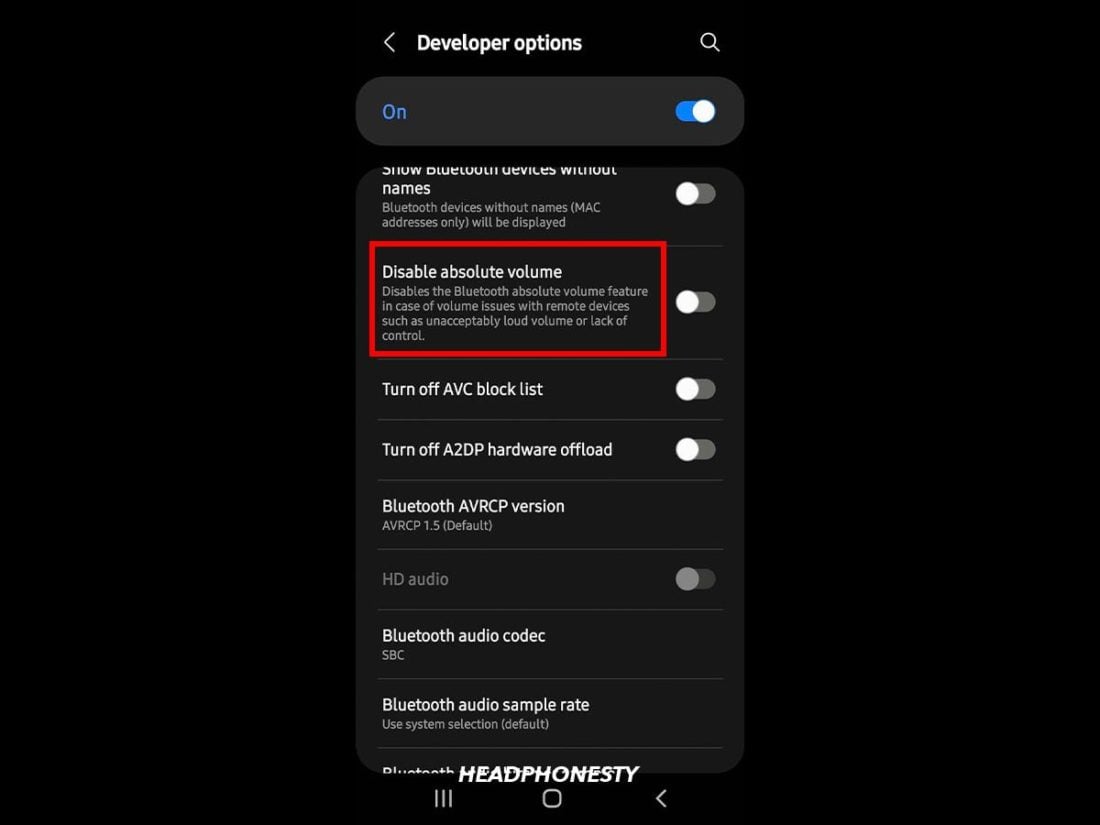
Credit: www.headphonesty.com
Optimize Earbud Fit
Optimizing the fit of your earbuds can make a big difference in sound loudness. A good fit blocks outside noise and keeps sound inside your ear. This helps you hear music or calls more clearly and loudly. Small changes in how earbuds fit can improve your listening experience a lot.
Focus on adjusting the ear tips and how you insert the earbuds. These two steps work together to create a better seal and boost sound quality.
Choose Correct Ear Tips
Ear tips come in different sizes. Small, medium, and large options are common. Pick the size that fits snugly in your ear canal. Tips that are too small let sound leak out. Tips that are too big cause discomfort and poor fit.
Try silicone or foam tips. Foam tips expand to fill your ear better. This blocks noise and improves bass and volume. Replace old or worn tips for better sound.
Ensure Proper Insertion
Insert earbuds gently but firmly into your ears. Twist them slightly to create a tight seal. The seal keeps sound from escaping and outside noise from entering. This makes sound clearer and louder without raising volume.
Check that earbuds sit comfortably and do not fall out. Adjust the angle if needed. Proper insertion helps earbuds work at their best.
Clean Your Earbuds
Cleaning your earbuds can improve sound quality and make them louder. Dirt and earwax block sound from coming through clearly. A simple clean can help your earbuds work better and last longer.
Remove Earwax And Debris
Earwax and dust often gather in the small speaker holes. Use a soft, dry cloth or a small brush to clear the openings. Avoid using water or sharp objects. This prevents damage and keeps sound clear. Gently wipe the mesh part to remove buildup. This step allows sound to pass freely and improves volume.
Maintain Regular Cleaning
Clean your earbuds every few days to stop dirt buildup. Regular care keeps the sound clear and loud. Store earbuds in a clean case after use. This protects them from dust and dirt. Consistent cleaning helps your earbuds work at their best. It also extends their life and saves money on replacements.

Credit: www.pamsteele.org
Use Volume-enhancing Apps
Volume-enhancing apps can help make your earbuds louder without changing the hardware. These apps adjust sound settings to boost audio output. They offer easy controls to improve your listening experience. Using these apps, you get louder sound without distortion.
Explore Equalizer Settings
Most volume apps include an equalizer. It lets you adjust sound frequencies like bass and treble. Raising mid and high frequencies can make sound clearer and louder. You can save your favorite settings for different music styles. Experiment with sliders to find what sounds best. Simple changes can increase volume without noise.
Try Third-party Boosters
Third-party boosters are apps designed to increase sound volume. They push audio beyond normal limits safely. Some apps add a small gain to your earbuds. Others use software tricks to enhance sound power. Choose apps with good user reviews and easy controls. Test a few to see which works best for your earbuds.
Update Firmware And Software
Keeping your earbuds’ firmware and your device’s software up to date can improve sound quality and volume. Updates often fix bugs and enhance performance. This can make your earbuds sound louder and clearer.
Check For Earbud Updates
Many earbuds connect to an app on your phone. Open the app and look for a firmware update option. Follow the instructions to download and install updates. This process can improve volume control and sound output.
Update Device Os
Your phone or tablet’s operating system affects how audio works. Go to your device’s settings and check for system updates. Installing the latest OS version can fix audio issues and boost sound volume. Keeping your device updated helps earbuds perform better.
Avoid Audio Distortion
Making earbuds louder can sometimes cause audio distortion. Distortion happens when the sound is too loud for the earbuds to handle. This makes music sound unclear or harsh. Avoiding distortion helps keep your music enjoyable and clear. Follow simple steps to increase volume safely.
Lower High Volume Risks
High volume can harm your ears over time. Listening at maximum volume often causes distortion. It also damages your earbuds’ speakers. Reducing volume slightly prevents these problems. Protect your hearing by keeping sound at a safe level. Use volume limits on your device for safety.
Balance Sound Quality And Loudness
More volume does not always mean better sound. Find a balance between loudness and clarity. Adjust equalizer settings to improve sound quality. Boost bass or treble carefully to avoid distortion. Clear sound feels louder even at lower volume. Focus on improving sound, not just raising volume.
Consider External Accessories
Making your earbuds louder can be simple with the right accessories. Some devices can boost sound without harming audio quality. These tools help you enjoy music louder and clearer.
External accessories often work better than just changing phone settings. They give you control over volume and sound clarity. Choosing the right one depends on your needs and budget.
Use Amplifiers Or Dacs
Amplifiers increase the power sent to your earbuds. This makes sounds louder and richer. Some amps are small and portable. You can carry them easily for daily use.
Digital-to-Analog Converters (DACs) improve sound quality. They convert digital music to better audio signals. Using a DAC with an amp can give you louder, clearer sound.
These devices connect between your phone and earbuds. They work with many types of earbuds and headphones. Make sure to choose one compatible with your gear.
Try Different Earbud Models
Not all earbuds have the same volume capacity. Some models naturally sound louder without damage. Look for earbuds designed for high volume levels.
In-ear earbuds often block outside noise well. This helps you hear music at lower volumes but clearer. Over-ear models may also offer better sound with less distortion.
Test different brands and types to find what suits your ears. Comfort and sound quality matter for long listening sessions.
Credit: www.youtube.com
Frequently Asked Questions
How Can I Increase My Earbuds Volume Safely?
To increase earbuds volume safely, avoid maxing out the volume. Use volume booster apps and adjust equalizer settings. Limit listening time to protect your hearing. Clean earbuds regularly for clear sound. Use noise-cancelling features to reduce background noise and improve perceived volume.
Why Are My Earbuds Too Quiet Even At Max Volume?
Earbuds may sound quiet due to dirt buildup, low device volume settings, or damaged earbuds. Check your device’s volume and sound settings. Clean the earbuds carefully. Try using a different device to test. Replace earbuds if they remain quiet after troubleshooting.
Can Software Apps Make Earbuds Louder?
Yes, volume booster and equalizer apps can enhance earbuds sound. These apps amplify audio output and adjust frequencies for clearer sound. Use trusted apps to avoid audio distortion. Avoid excessive boosting to prevent damaging earbuds or hearing.
Does Earwax Affect Earbud Sound Quality?
Yes, earwax can block sound and reduce volume. Clean your ears and earbuds regularly to maintain sound clarity. Use gentle cleaning methods to avoid damage. Keeping earbuds and ears clean improves overall audio performance.
Conclusion
Making your earbuds louder can improve your listening experience. Check your device’s volume settings first. Clean your earbuds carefully to remove dirt and wax. Try using different ear tips for a better fit and sound seal. Use apps that boost volume but avoid going too high to protect hearing.
Small changes can make a big difference. Enjoy clearer, louder sound safely every time you listen. Keep these tips handy for better audio on the go.
As an Amazon Associate, I earn from qualifying purchases.