
Do you ever feel like your headphones just aren’t loud enough, no matter how much you turn up the volume? It’s frustrating when your favorite songs, podcasts, or videos don’t have the punch you want.
But what if you could easily boost your headphones’ sound without buying new gear? You’ll discover simple and effective ways to make your headphones louder, so you can enjoy every beat and word clearly. Keep reading, because the solution might be easier than you think.
Check Your Device Settings
Checking your device settings can help make your headphones louder. Many devices have built-in limits and audio controls that affect sound volume. Adjusting these settings can improve sound output without extra equipment.
Start by exploring your device’s audio settings. Small changes here can increase volume and sound quality. Let’s look at three key settings to check.
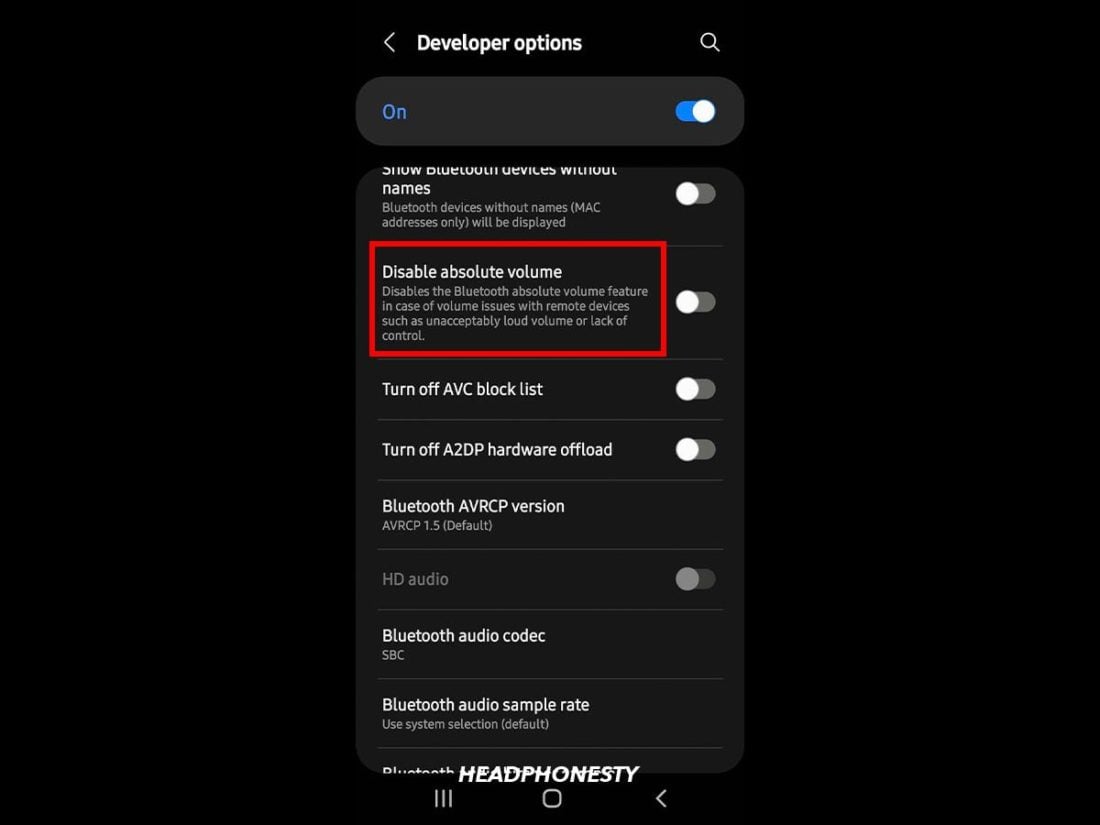
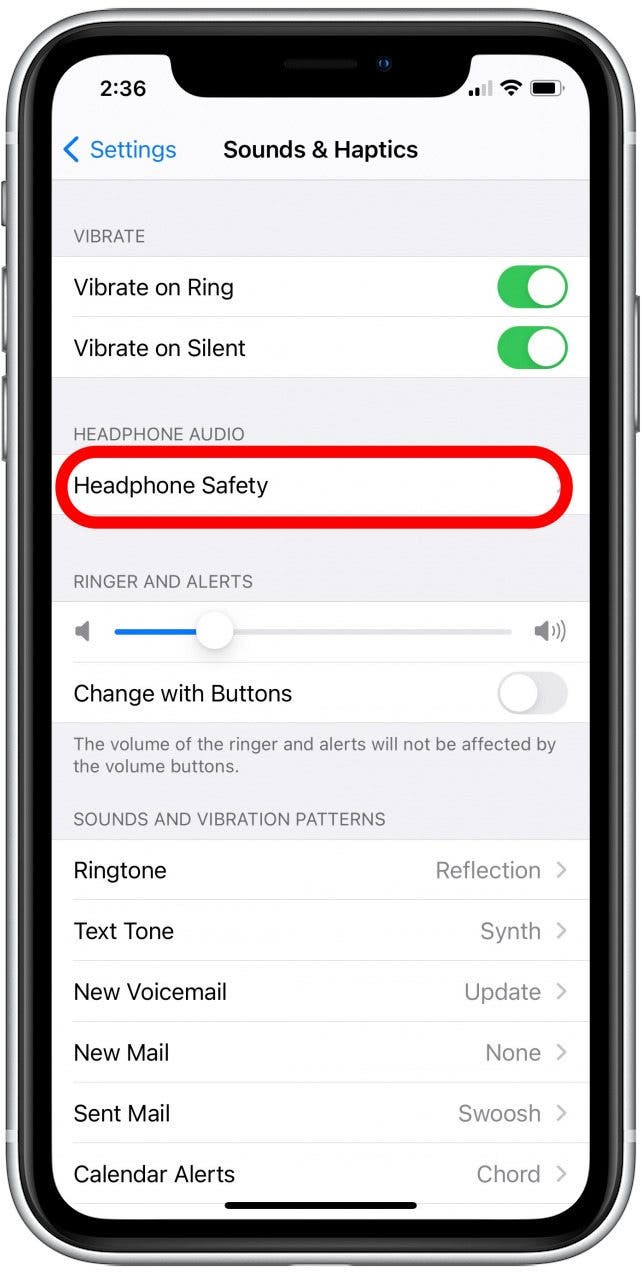
Increase Volume Limits
Devices often have volume limits to protect hearing. These limits can keep your headphones from reaching full volume. Find the volume limit setting in your device’s sound or audio menu. Raise the limit or turn it off if possible. This change allows your headphones to play louder sounds safely.
Adjust Equalizer Settings
The equalizer controls different sound frequencies. Boosting certain frequencies can make audio seem louder. Look for the equalizer in your sound settings or music app. Increase the bass and treble slightly to enhance volume perception. Experiment with settings to find the best sound for your headphones.
Disable Volume Normalization
Volume normalization keeps all sounds at a similar level. It stops loud sounds from getting too loud. Turning off normalization can increase headphone volume. This setting is usually in sound or streaming app options. Disabling it lets your audio reach its natural loudness.
Credit: www.headphonesty.com
Use A Headphone Amplifier
Using a headphone amplifier is a smart way to make your headphones louder. It boosts the audio signal and improves sound quality. This device helps especially if your headphones sound weak or quiet. An amplifier gives your music more power and detail. It works with many headphone types and devices.
Types Of Amplifiers
There are several types of headphone amplifiers. Some are simple and small, made for basic use. Others are advanced with extra features like bass boost or equalizers. Tube amplifiers use vacuum tubes for warm, rich sound. Solid-state amplifiers use transistors for clear and clean audio. Each type changes how your music sounds.
Portable Vs Desktop Options
Portable amplifiers are small and light. They fit in your pocket and work on the go. Perfect for mobile phones, laptops, and travel. Desktop amplifiers are larger and stay on a desk. They need power from an outlet. Desktop amps provide stronger sound and better control. Choose based on where you want to use your headphones.
Choosing The Right Amplifier
Pick an amplifier that matches your headphones. Check the headphone’s impedance and sensitivity. High-impedance headphones need more power from an amp. Look for amps with enough output for your device. Consider the size and weight if you move a lot. Also, think about extra features that might help your listening.
Optimize Your Audio Source
Optimizing your audio source is a key step to make your headphones louder. The quality of the sound file and the settings on your device affect volume and clarity. Better source audio means better sound output, helping you enjoy louder and clearer music.
Use High-quality Audio Files
Choose audio files with high bitrates like 320 kbps or lossless formats. Low-quality files often sound quiet and dull. High-quality files have more sound information. This makes music louder and richer through your headphones.
Streaming Settings For Better Sound
Check your music app’s streaming quality settings. Set them to the highest option available. Low settings reduce sound clarity and volume. Using high-quality streaming keeps the audio loud and clear. A fast internet connection helps avoid sound drops.
Update Audio Drivers
Audio drivers control sound on your device. Old or faulty drivers can lower volume. Visit your device’s website to download the latest drivers. Updating drivers fixes bugs and improves sound output. This step can make your headphones sound louder and clearer.
Credit: www.iphonelife.com
Modify Headphone Fit And Seal
Modifying the fit and seal of your headphones can make a big difference in sound volume and quality. A proper fit helps block outside noise and directs sound clearly into your ears. This simple step can make your headphones seem louder without raising the volume.
Select Proper Ear Tips
Choose ear tips that fit snugly in your ear canal. They come in different sizes, like small, medium, and large. A tight fit stops sound from leaking out. Foam tips often provide a better seal than silicone ones. Changing to the right ear tips can improve sound loudness and comfort.
Adjust Headband For Comfort
Make sure the headband sits well on your head. Adjust it so the headphones press gently but firmly against your ears. A loose fit lets sound escape, making audio seem quieter. A good seal creates better sound pressure and clearer audio. Comfort matters too, so adjust slowly until it feels right.
Improve Noise Isolation
Noise isolation blocks background sounds and boosts headphone volume. Use ear tips that cover your ears fully or fit inside tightly. Sometimes, adding foam covers or ear pads helps seal gaps. Better isolation means your ears hear more music and less noise. This makes your headphones sound louder without extra power.
Try Software Enhancements
Software tools can help increase your headphone volume safely. These tools adjust sound settings to make audio clearer and louder. They work well with many devices and do not need extra hardware.
Try different apps and settings to find what fits your ears. Small changes can make a big difference in sound quality and loudness.
Use Audio Enhancement Apps
Audio enhancement apps improve sound by boosting volume and clarity. Some apps focus on increasing bass or treble. Others remove noise or add effects to make music richer. Many are free or low cost and easy to install. Use apps designed for your device for best results.
Apply Equalizer Presets
Equalizers change sound frequencies to improve listening. Presets are ready-made settings for different music types. Choose presets like “Rock,” “Pop,” or “Bass Boost” to increase volume. Adjusting equalizer sliders manually can also help. This fine-tunes sound to your personal taste.
Enable Loudness Boost Features
Many devices have a loudness boost option in sound settings. This feature raises low volumes without distortion. It balances audio for clearer and louder playback. Turn on loudness boost in your phone or computer settings. This simple step can make headphones sound much louder.

Credit: www.youtube.com
Maintain And Clean Your Headphones
Keeping your headphones clean and well-maintained helps improve sound quality. Dirt and damage can block sound and reduce volume. Regular care keeps your headphones working louder and clearer. Simple steps make a big difference in sound performance.
Remove Earwax And Debris
Earwax and dust often collect on ear pads and speakers. Use a soft brush or cloth to wipe them gently. Avoid using water or harsh chemicals. Clean the mesh covering the speakers carefully to avoid damage. Removing debris helps sound flow better and stay loud.
Check For Damaged Components
Look for cracks, loose wires, or worn-out parts. Damaged cables or connectors can lower sound volume. Replace or repair broken parts quickly. Test your headphones after fixing to ensure sound is strong again. Well-kept parts deliver clearer, louder audio.
Store Headphones Properly
Keep headphones in a dry, cool place. Avoid direct sunlight and moisture. Use a case or pouch to protect them from dust and damage. Proper storage prevents wear and tear on parts and wires. Safe storage helps maintain loud, clear sound longer.
Frequently Asked Questions
How Can I Increase Headphone Volume Safely?
You can increase headphone volume by adjusting device settings or using volume booster apps. Always avoid maxing volume to prevent hearing damage. Use headphones with higher sensitivity or an external amplifier for louder sound safely.
Does Using An Amplifier Make Headphones Louder?
Yes, an amplifier boosts the audio signal, making headphones louder and clearer. It enhances sound quality and volume, especially for high-impedance headphones. Amplifiers are ideal for audiophiles seeking better sound without risking damage from maxed device volume.
Can Equalizer Settings Improve Headphone Loudness?
Equalizer settings can enhance perceived loudness by boosting certain frequency ranges. Adjust bass and treble to make audio sound fuller and louder. However, equalizers don’t increase actual volume but improve sound clarity and impact.
Are Volume Booster Apps Effective For Louder Headphones?
Volume booster apps can increase headphone loudness by amplifying audio output. Their effectiveness varies by device and app quality. Use trusted apps and avoid excessive boosting to protect your hearing and prevent audio distortion.
Conclusion
Making your headphones louder can improve your listening experience. Start by checking your device’s volume settings. Use apps or software designed to boost sound safely. Clean your headphones regularly for clearer audio. Avoid increasing volume too much to protect your hearing.
Small changes can make a big difference. Enjoy better sound without extra costs or risks. Try these simple steps to get more from your headphones today.
As an Amazon Associate, I earn from qualifying purchases.

