
As an Amazon Associate, I earn from qualifying purchases.
Moving your computer monitors can be tricky. These screens are fragile and expensive, so you want to make sure they arrive safe and sound.
If you’re wondering how to pack monitors for moving without risking cracks or scratches, you’re in the right place. This guide will show you simple, effective steps to protect your screens during the move. Keep reading to learn the best tips and tricks to keep your monitors safe—so you can focus on settling into your new space without any tech troubles.
Choose The Right Box
Choosing the right box is key to packing monitors safely. The box protects the screen and internal parts during the move. A good box reduces the risk of damage. Picking a box that fits well and is strong enough keeps the monitor secure. This step helps make moving less stressful and keeps your monitor in good shape.
Select A Sturdy Box
Find a box made from thick, strong cardboard. Double-walled boxes work best for heavy or fragile items. Thin boxes can bend or tear easily. A sturdy box handles bumps and drops better. Check the box for any holes or weak spots. Use a new box or one in excellent condition.
Consider Size And Fit
Choose a box slightly larger than your monitor. Leave space for padding material around the monitor. Too big a box lets the monitor move inside. Too small a box can press on the screen. Measure your monitor’s width, height, and depth. Add a few inches for cushioning material.
Gather Packing Materials
Gathering the right packing materials is the first step to protect your monitor during a move. Using proper supplies helps prevent damage and keeps the screen safe. Prepare all materials before packing to make the process smooth and efficient.
Use Bubble Wrap And Foam
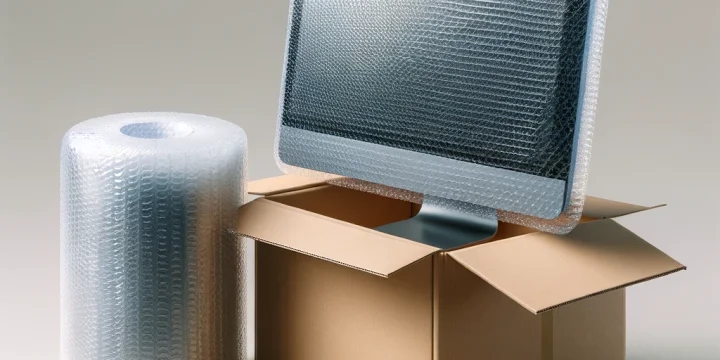
Bubble wrap cushions the monitor by absorbing shocks and bumps. Wrap the screen carefully, covering all edges and corners. Foam sheets add extra protection by filling empty spaces. Combine bubble wrap and foam for strong padding around the monitor.
Have Packing Tape Ready
Packing tape secures the bubble wrap and foam in place. Use strong, wide tape for better hold. Avoid taping directly on the screen or delicate parts. Keep tape rolls close to save time while packing.
Prepare The Monitor
Preparing your monitor before moving is very important. It helps protect the screen and other parts from damage. Taking simple steps can make packing easier and safer. Start by cleaning and then removing cables and accessories. These small tasks save time later and keep everything organized.
Clean The Screen
Use a soft, dry cloth to wipe the screen gently. Avoid using water or harsh cleaners that can harm the display. Removing dust and fingerprints prevents scratches during the move. Clean the edges and corners carefully to clear all dirt.
Remove Cables And Accessories
Unplug all cables connected to the monitor. This includes power cords, HDMI, and USB cables. Keep the cables in a labeled bag to avoid confusion later. Remove any stands or mounts if possible. Packing these separately reduces the risk of damage.
Credit: www.uhaul.com
Wrap The Monitor Securely
Wrapping your monitor securely protects it from scratches and damage during moving. Proper wrapping cushions the screen and keeps it safe from bumps. Follow these steps to wrap your monitor carefully.
Cover The Screen With A Soft Cloth
Start by placing a soft cloth over the monitor screen. Use a microfiber or cotton cloth to avoid scratches. Make sure the cloth covers the entire screen surface. This layer protects the screen from dust and small impacts.
Apply Bubble Wrap
Next, wrap the monitor with bubble wrap for extra cushioning. Use enough bubble wrap to cover the whole monitor, especially the corners. Secure the bubble wrap with tape, but avoid sticking tape directly on the screen. Bubble wrap absorbs shocks and keeps the monitor safe in transit.
Pack The Monitor In The Box
Packing a monitor in a box takes care and attention. This step protects your screen from damage during moving. Use the right materials and follow these steps to keep your monitor safe.
Add Cushioning To The Box
Start by placing soft cushioning at the bottom of the box. Use bubble wrap, foam sheets, or crumpled packing paper. This layer absorbs shocks and stops the monitor from sliding. Make sure the cushioning is thick enough to protect the screen.
Place The Monitor Carefully
Hold the monitor by its edges. Avoid touching the screen to prevent smudges or damage. Put the monitor in the box standing upright. Do not lay it flat, as this can cause pressure on the screen. Align the monitor so it fits snugly inside the cushioning.
Fill Empty Spaces
Fill all gaps around the monitor with soft materials. Use packing peanuts, crumpled paper, or foam inserts. This prevents the monitor from moving inside the box. Make sure the box feels firm but not too tight. This extra padding keeps the monitor safe during transport.
Credit: artymovers.com
Seal And Label The Box
Sealing and labeling the box is a crucial step in packing monitors for moving. It keeps your monitor safe and helps movers know how to handle it. Proper sealing stops dust and moisture from getting inside. Clear labels guide careful handling and quick identification.
Tape The Box Securely
Use strong packing tape to close all open edges. Seal the top and bottom flaps well. Wrap tape around corners to prevent the box from opening. Avoid using thin or weak tape that can break easily. Apply tape in an H-shape for better hold.
Mark As Fragile
Write “Fragile” clearly on multiple sides of the box. Use a bold marker so the text stands out. Add arrows pointing up to show the correct box position. This signals movers to carry the box gently. It reduces the risk of damage during transit.
Transport Tips
Transporting monitors safely requires careful handling. Protecting the screen and internal parts is key. Simple steps during transport can prevent damage and keep your monitor working well.
Focus on how you carry and store the monitor during the move. Small actions make a big difference.
Keep The Box Upright
Always carry the monitor box in an upright position. Lying it flat can cause pressure on the screen. This may lead to cracks or dead pixels.
Use labels on the box to remind movers. Mark “This Side Up” clearly on all sides.
Avoid Extreme Temperatures
Monitors are sensitive to heat and cold. Avoid leaving the box in hot cars or freezing places. Extreme temperatures can harm the screen and internal parts.
Keep the monitor in a temperature-controlled space during transport. This protects the electronics and display quality.

Credit: www.youtube.com
Frequently Asked Questions
How Do I Safely Pack Monitors For Moving?
Use the original box or a sturdy box with foam padding. Wrap the screen with a soft cloth or bubble wrap. Secure cables separately and label everything for easy setup later. Avoid pressure on the screen to prevent damage during transit.
What Materials Are Best For Packing Monitors?
Use bubble wrap, anti-static foam, packing peanuts, and strong cardboard boxes. Soft cloths protect the screen from scratches. Avoid heavy materials that might exert pressure on the monitor surface during moving.
Should I Remove The Monitor Stand Before Packing?
Yes, removing the stand reduces bulk and prevents damage. Wrap the stand separately in bubble wrap. Keep screws and small parts in a labeled bag for easy reassembly after moving.
How To Protect The Monitor Screen During Transport?
Cover the screen with a soft cloth or bubble wrap. Place a rigid board in front of the screen inside the box to prevent impact. Ensure the monitor is tightly packed without movement inside the box.
Conclusion
Packing monitors carefully protects them during your move. Use soft cloths or bubble wrap around screens. Place monitors in sturdy boxes with cushioning material. Keep cables and accessories organized in separate bags. Label each box clearly to avoid confusion later.
Handle boxes gently to prevent damage. Taking these simple steps saves time and money. Protect your monitors for a smooth moving day. Careful packing keeps your screens safe and ready.
As an Amazon Associate, I earn from qualifying purchases.

