
Are you unsure how to read the numbers on your Omron blood pressure monitor? You’re not alone.
Understanding your blood pressure readings is key to taking control of your health. This simple device gives you important information, but only if you know what the numbers mean. You’ll learn exactly how to read your Omron monitor with confidence.
By the end, you’ll feel empowered to track your heart health and make informed decisions every day. Keep reading to unlock the full benefits of your monitor.
Credit: www.omronbrandshop.com
Choosing The Right Omron Monitor
Choosing the right Omron blood pressure monitor is important for accurate readings. Different models suit different needs. Some are simple, while others have extra features. Picking the right one saves time and helps manage health better.
Types Of Omron Monitors
Omron offers wrist and upper arm monitors. Upper arm models are more common and accurate. Wrist monitors are smaller and easy to carry. Some models have digital screens with large numbers. Others show additional info like heart rate.
Features To Look For
Look for easy-to-read displays. Some monitors store past readings. This helps track blood pressure over time. Automatic inflation and deflation make the process simple. Check for memory capacity and battery life too. Some models connect to smartphones for extra tracking.
Preparing For Measurement
Preparing for measurement is key to getting accurate readings from your Omron blood pressure monitor. Small mistakes during this step can affect your results. Taking a few minutes to prepare properly makes a big difference.
Proper Cuff Placement
Place the cuff on your bare upper arm. Avoid thick clothing that can block the cuff. The bottom edge of the cuff should be about 1 inch above the elbow. Wrap the cuff snugly but not too tight. It should feel comfortable. The tube must point down toward your hand.
Body Positioning Tips
Sit in a chair with your feet flat on the floor. Keep your back straight and supported. Rest your arm on a table at heart level. Stay still and relaxed during the measurement. Avoid talking or moving your arm. These steps help your monitor give accurate results.
Operating The Device
Operating the Omron blood pressure monitor is simple. The device is designed for easy use at home. Understanding how to start and read the device helps you track your health better.
Starting The Measurement
Place the cuff on your upper arm snugly. Sit quietly with your arm resting on a table. Press the start button on the monitor. The cuff will inflate automatically. Stay still and relaxed while the device measures your blood pressure. The screen will show the process clearly.
Using Buttons And Display
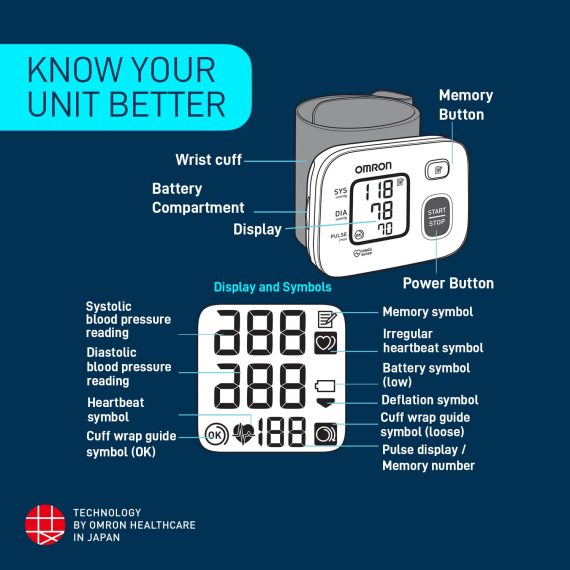
The main button powers the device on and off. Other buttons let you review past readings. The display shows systolic and diastolic pressure numbers. It also shows your pulse rate. Icons and symbols guide you through the reading. Watch the screen for any error messages.
Credit: www.omronhealthcare-ap.com
Interpreting Results
Understanding your Omron blood pressure monitor results is key to tracking your health. The device shows several numbers and symbols. Each tells a part of your heart’s story. Learning to read these results helps you act wisely for your well-being.
Systolic And Diastolic Numbers
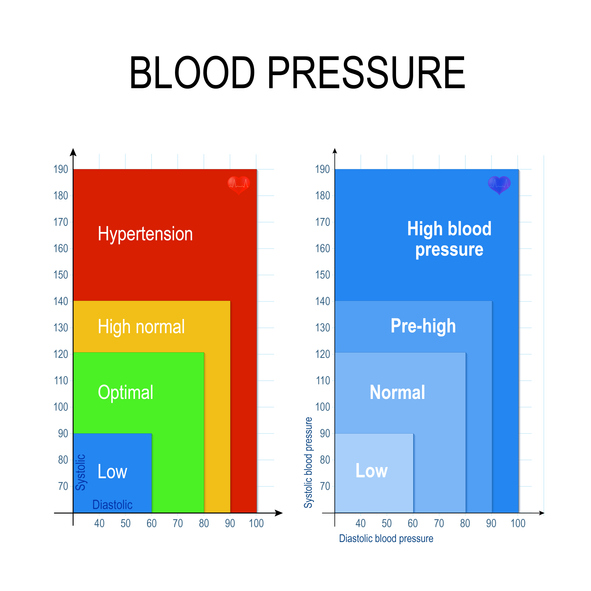
The first number is the systolic pressure. It measures the force your heart uses to pump blood. The second number is diastolic pressure. It shows the pressure in your arteries when your heart rests between beats. Normal readings are usually around 120/80 mmHg.
Pulse Rate Meaning
Your pulse rate shows how many heartbeats occur per minute. It tells how fast your heart is working. A typical pulse rate for adults ranges from 60 to 100 beats per minute. A rate outside this range may need medical advice.
Color Indicators And Alerts
Omron monitors use colors to help you understand results quickly. Green means your blood pressure is normal. Yellow indicates caution, suggesting you check your health soon. Red signals high blood pressure, and you should contact a doctor. Alerts also flash if the cuff is not placed correctly.
Storing And Tracking Data
Keeping track of your blood pressure readings is important for health monitoring. Omron blood pressure monitors offer easy ways to store and review your data. This helps you see patterns and share information with your doctor.
Storing your readings right after measuring saves time. It also prevents losing important health details. Let’s explore how to use the memory function and mobile apps to track your data.
Memory Function
Most Omron monitors have a built-in memory feature. This function stores multiple readings automatically. You can check past measurements without writing anything down. The device often remembers readings for one or two users.
To access stored data, press the memory button on the monitor. The screen will show your previous readings with dates and times. This makes it easy to monitor your blood pressure trends over days or weeks.
Using Mobile Apps
Many Omron monitors connect to mobile apps via Bluetooth. These apps collect your readings in one place. You can view charts and graphs that show your blood pressure changes over time.
Apps also allow you to add notes or track other health data. Some offer reminders for regular measurements. This helps keep your monitoring consistent and organized.
Troubleshooting Common Issues
Troubleshooting common issues with your Omron blood pressure monitor helps ensure accurate readings. Small problems can cause errors or discomfort. Knowing how to fix these issues saves time and worry. Below are common problems and easy solutions.
Error Messages
Omron monitors show error codes to signal problems. The most common is “Err.” This means the reading failed. Try to stay still and keep the arm at heart level. Check that the cuff is on correctly and not too tight.
If the device shows “Lo” or “Hi,” the pressure is outside the monitor’s range. “Lo” means very low pressure or weak pulse. “Hi” means very high pressure. Wait a few minutes before trying again or consult a doctor.
Battery issues can also cause errors. Replace weak batteries with new ones. Make sure they are inserted the right way.
Cuff Fit Problems
A poor cuff fit affects readings and comfort. The cuff should wrap snugly around your upper arm. Not too loose or too tight. You should be able to slide one finger under the cuff.
Choose the right cuff size for your arm. Using a cuff that is too small or large leads to wrong numbers. Most Omron kits come with a standard cuff. Larger or smaller sizes are available separately.
Place the cuff about one inch above the elbow. The tube should run down the inside of your arm. Avoid twisting or folding the cuff. Sit still and relax during the measurement for best results.

Credit: www.biomedsuppliers.com
Frequently Asked Questions
How Do I Read The Systolic Number On Omron Monitor?
The systolic number is the top value on the Omron display. It shows the pressure in your arteries when your heart beats. This number helps assess heart health and risk of hypertension.
What Does The Diastolic Number Indicate On Omron?
The diastolic number is the bottom value on the screen. It represents the pressure in your arteries when your heart rests between beats. A normal diastolic reading is crucial for overall cardiovascular health.
How To Interpret The Pulse Rate Shown On Omron?
The pulse rate appears below the blood pressure readings. It shows the number of heartbeats per minute. A normal pulse rate ranges from 60 to 100 beats per minute in adults.
What Do Error Messages On Omron Monitor Mean?
Error messages indicate issues like improper cuff placement or movement during measurement. Follow the device instructions to correct errors. Proper use ensures accurate blood pressure readings.
Conclusion
Reading your Omron blood pressure monitor is simple with practice. Check the numbers carefully each time. Know that the top number shows your heart’s pressure when it beats. The bottom number shows pressure when your heart rests. Use this guide to track your health daily.
Stay calm and sit still while measuring. Keep a record to share with your doctor. Small steps help you understand your body better. Stay consistent and take care of your health. Easy and clear.
As an Amazon Associate, I earn from qualifying purchases.

