Starting your Ford F-150 remotely can make your day easier, whether you want to warm up your truck in winter or cool it down in summer. Many owners are not sure how remote start works, what is required, or which models support it.
Here’s a complete, practical guide to using remote start on your Ford F-150, with clear steps, important tips, and answers to common problems.
What Is Remote Start On Ford F-150?
The remote start system lets you start your truck’s engine from a distance using the key fob or a smartphone app. This feature helps you pre-heat or pre-cool the cabin before you drive. It also keeps your doors locked while the engine is running, adding a layer of security.
Most Ford F-150 models from 2015 onward offer remote start, either as a standard feature or as an option. Older models may require an upgrade or installation of a dealer-approved kit.
Checking If Your F-150 Has Remote Start
Before you try using remote start, it’s important to check if your truck supports it. Here’s how:
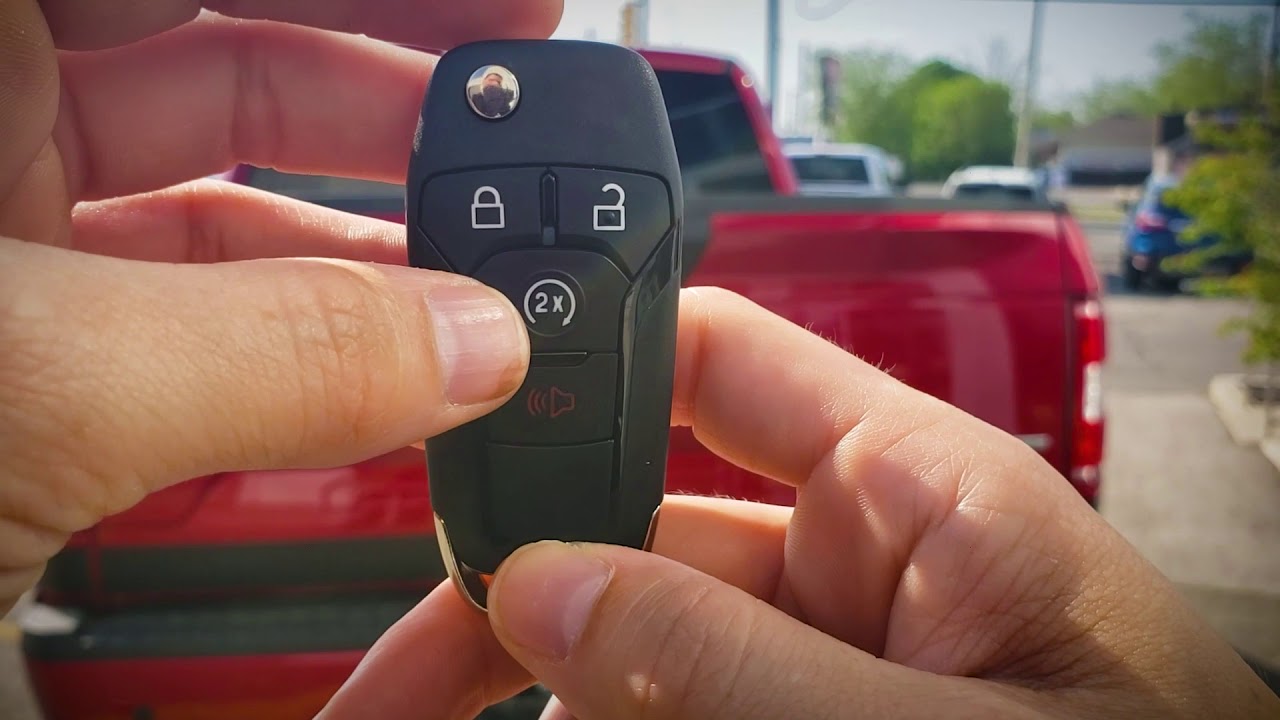
- Look at your key fob. If you see a button with a circular arrow, your F-150 likely has remote start.
- Check your owner’s manual under “Keys and Remote Controls” or “Remote Start.”
- Go to the vehicle settings menu on your dashboard. Some models show “Remote Start” as an option.
- If you are not sure, ask your Ford dealer using your truck’s VIN.
Insight: Not all F-150s have remote start enabled, even if the hardware is present. Sometimes, a dealer must activate the feature.
Credit: www.youtube.com
How To Remote Start Ford F-150 Using The Key Fob
Starting your truck with the key fob is quick and easy. Follow these steps:
- Lock all doors by pressing the lock button on your fob. Remote start will not work if any door is open or unlocked.
- Press the remote start button (circular arrow) twice. On most models, press once to activate, then hold down on the second press for about 2-3 seconds.
- Watch for lights. The turn signals will flash twice, and the engine will start. The truck remains locked.
- Get in and drive. When you are ready, unlock the door, get in, and press the brake with your foot. Push the start button (for push-to-start models) or turn the key to “on” (for key models).
Tip: If your F-150 does not start, check if the “Check Engine” light is on or if the hood is open. Remote start will not work in these conditions.
Remote Start With Fordpass App
Many newer F-150s (2018 and later) support starting the engine from your smartphone using the FordPass app. Here’s how to use it:
- Download the FordPass app from the App Store or Google Play.
- Register and connect your vehicle. You need your F-150’s VIN and a Ford account.
- Open the app and look for the “Start” button.
- Press and hold the Start icon. The app will confirm with a message when the engine starts.
Benefit: The FordPass app can work from almost anywhere with cell signal, not just the range of your key fob.
Non-Obvious Insight: FordPass also lets you schedule remote starts at certain times, so your truck is always ready when you need it.
How Long Will Your F-150 Run After Remote Start?
The default remote start runtime is 5, 10, or 15 minutes depending on your settings. You can extend the run time once by repeating the remote start process. After that, the engine will shut off automatically.
Here is a quick comparison of runtime settings:
| Model Year | Default Run Time | Max Extensions |
|---|---|---|
| 2015-2017 | 10 min | 1 |
| 2018-2023 | 15 min | 1 |
Note: If you do not enter and drive the truck after two cycles, you must manually restart the engine with the key.
Customizing Remote Start Settings
You can adjust several features to fit your preferences:
- Climate Control: Set whether the truck uses last settings or “Auto” mode to heat or cool the cabin.
- Heated Seats/Steering Wheel: Some models turn these on automatically in cold weather.
- Remote Start Run Time: Adjust between 5, 10, or 15 minutes in the vehicle’s settings menu.
To change these, use the instrument cluster menu:
- Go to “Settings.”
- Select “Vehicle.”
- Choose “Remote Start.”
- Adjust options as needed.
Practical Tip: Using “Auto” climate mode saves fuel because the system only runs as much as needed.
Common Problems And How To Solve Them
Sometimes, remote start does not work. Here are the most frequent issues and solutions:
- Door not locked: Always lock doors before starting.
- Hood open or not latched: The system will block remote start for safety.
- Check Engine light on: Fix engine codes before using remote start.
- Key fob battery low: Replace the battery if the range is short.
- Too many remote starts: After two cycles, start manually.
If all else fails, visit your Ford dealer for a diagnostic check.
Comparing Key Fob Vs. Fordpass App
Both methods let you start your F-150 remotely, but each has unique advantages.
| Feature | Key Fob | FordPass App |
|---|---|---|
| Range | ~300 feet | Unlimited (cell signal) |
| Setup Needed | None | App install + registration |
| Extra Features | No | Yes (scheduling, vehicle info) |
| Works if fob battery dead? | No | Yes |
Non-Obvious Insight: The app can send alerts for maintenance or recalls, not just remote start.

Credit: accessorides.com
Safety And Legal Considerations
Remote start is safe if used as designed, but always follow these guidelines:
- Never leave children or pets in a running vehicle.
- Make sure the truck is parked outside or in a well-ventilated area.
- Some cities or states have anti-idling laws. Check local rules before using remote start for long periods.
- The truck will not move unless the key is present and brake is pressed.
For more details, see the National Highway Traffic Safety Administration.
Frequently Asked Questions
How Do I Know If My F-150 Supports Remote Start?
Check your key fob for a circular arrow button, look in your owner’s manual, or ask your Ford dealer with driving details like year and trim.
Can I Add Remote Start To An Older F-150?
Yes, many Ford dealers sell remote start kits for older models. Installation costs and compatibility may vary.
Will My Truck Stay Locked During Remote Start?
Yes. All doors remain locked when you remote start your F-150, so only the person with the key can enter and drive.
Does Remote Start Use More Fuel?
Remote start uses fuel while idling, but the amount is small for most short starts. Using climate “Auto” mode helps minimize extra fuel use.
What Should I Do If Remote Start Stops Working?
Check that all doors and hood are closed, the “Check Engine” light is off, and the key fob battery is strong. If problems continue, visit your dealer.
Using remote start on your Ford F-150 is simple once you know the steps. With the key fob or FordPass app, you can enjoy a comfortable cabin every time you drive. Always follow safety tips, and don’t hesitate to ask your dealer if you need help activating or troubleshooting remote start.
This feature is more than a luxury—it’s a practical tool for comfort and convenience year-round.

Credit: www.reddit.com
As an Amazon Associate, I earn from qualifying purchases.