Are your JLab earbuds still on, and you’re not sure how to switch them off? It can be frustrating when your earbuds keep running and drain your battery.
Knowing the simple steps to turn off your JLab earbuds will save you time and keep your devices ready for the next use. You’ll discover the easiest ways to power down your earbuds quickly and effortlessly. Keep reading, and you’ll never have to worry about accidentally leaving your earbuds on again.
Powering Off Jlab Earbuds
Powering off JLab earbuds helps save battery and keeps them safe. Knowing how to turn them off is useful. It stops unwanted sound and keeps your earbuds ready for next use.
Different JLab models may have different ways to power off. Some earbuds turn off automatically when placed in the case. Others need a button press. Understanding your model’s method ensures you power off correctly.
Turning Off Jlab Earbuds Manually
Press and hold the multifunction button on each earbud. Hold it for about 3 to 5 seconds. You will hear a sound or see a light blink. This means the earbuds are turning off.
Make sure to do this for both earbuds if using them separately. This manual method works well if your earbuds do not auto power off.
Using The Charging Case To Power Off
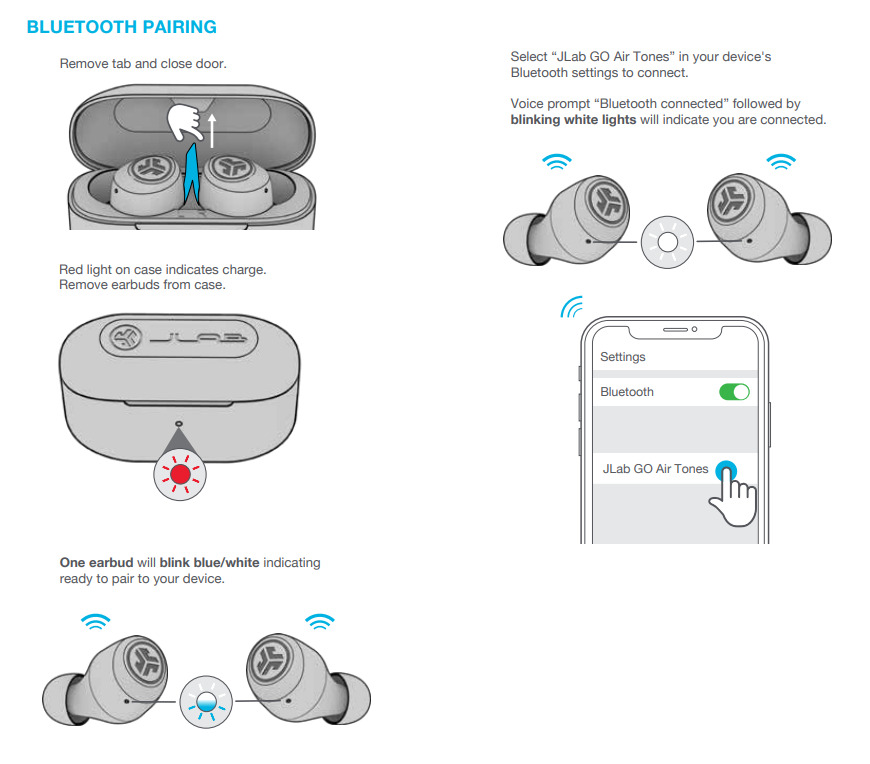
Most JLab earbuds turn off when placed inside the charging case. Put both earbuds in the case gently. Close the lid. The earbuds will power off automatically and start charging.
This method is quick and helps save battery life. Always store your earbuds in the case after use for protection and charging.
Checking For Auto Power-off Settings
Some JLab earbuds have auto power-off features. They turn off after a few minutes of no use. You can check this in the JLab app if available. Adjust the timer or enable the feature for convenience.
Auto power-off saves battery and prevents earbuds from staying on by mistake. It’s helpful if you often forget to turn them off manually.

Credit: www.youtube.com
Manual Shut Down Steps
Turning off JLab earbuds manually is simple and quick. Knowing the exact steps helps save battery and protects your earbuds. This guide explains how to power off your earbuds using two main methods. Both are easy to follow and work well for all JLab models.
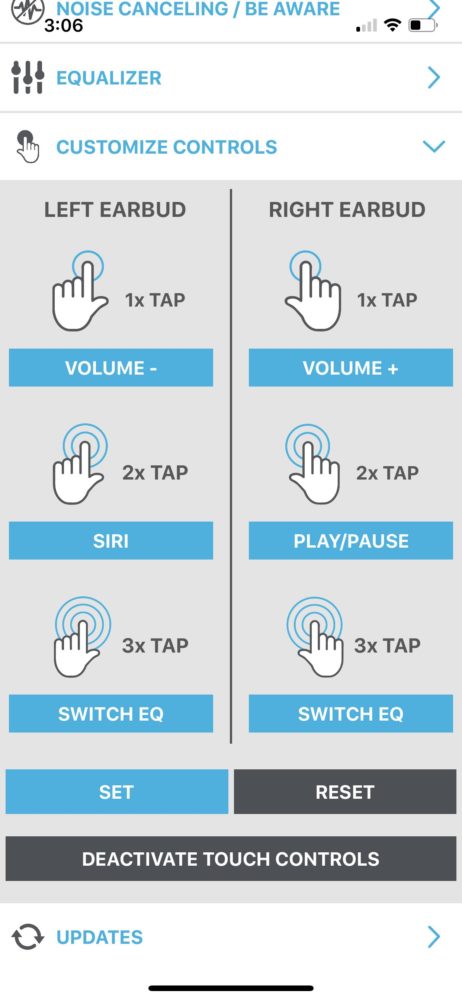
Using The Touch Controls
Many JLab earbuds have touch-sensitive areas for control. To turn off the earbuds, tap and hold the touch area. Keep holding for about 3 to 5 seconds. You will hear a sound or voice prompt signaling the power off. Release the touch area once the earbuds shut down.
This method avoids buttons and feels smooth. It works best for newer models with touch controls. Practice a few times to get the timing right.
Button-based Power Off
Older or basic JLab earbuds use physical buttons. Press and hold the power button for several seconds. Usually, hold for 4 to 6 seconds until the lights turn off. You may hear a tone or voice that confirms the earbuds are off.
Some models combine the power button with volume or multifunction buttons. Check which button controls power for your earbuds. This button method is reliable and works even if touch controls fail.
Auto Power Off Feature
The Auto Power Off feature in JLab earbuds helps save battery life. It turns off the earbuds automatically after a set time of inactivity. This feature stops the earbuds from draining power when you forget to switch them off. It is a simple way to extend your earbud usage between charges.
Idle Time Settings
You can adjust the idle time before the earbuds power off. The default setting usually turns them off after 10 minutes of no use. Some models let you choose different time intervals. This flexibility helps fit your daily routine and listening habits. Check your earbud manual or app to change the idle time.
Battery Saving Benefits
The Auto Power Off feature reduces battery waste effectively. It keeps your earbuds ready for longer periods without charging. Less frequent charging means better battery health over time. This feature also helps avoid surprises when your earbuds run out of power during use. It ensures your device lasts through the day with ease.
Troubleshooting Power Issues
Power problems can be frustrating with JLab earbuds. Sometimes, earbuds refuse to turn off. This can drain the battery quickly. Troubleshooting these issues helps save power and extends battery life.
Start by checking the earbuds and their case. Dirt or debris might block sensors. Also, a firmware glitch can cause power issues. Follow simple steps to fix these problems fast.
When Earbuds Won’t Turn Off
Sometimes earbuds keep playing or stay on. Press and hold the power button for 10 seconds. This often forces the earbuds to shut down. If that fails, place the earbuds back in the charging case.
Make sure the case has enough charge. Close the lid and wait for 30 seconds. This action signals the earbuds to power off. If earbuds still stay on, check for any stuck buttons.
Resetting The Earbuds
Resetting can fix many power issues. To reset, remove earbuds from the charging case. Press and hold the power button on both earbuds for 15 seconds. You will see the LED light flash, showing reset success.
After reset, place earbuds back in the case. Close the lid and wait a minute. Then take them out and try powering on again. Resetting clears minor software bugs causing power problems.
Charging Case Role
The charging case plays a key role in turning off your JLab earbuds. It not only charges the earbuds but also powers them down. This helps save battery and keeps the earbuds ready for the next use.
Placing earbuds in the charging case ensures they switch off automatically. This feature avoids the need for manual power off. The case controls the earbuds’ power state based on their position inside it.
How Case Powers Off Earbuds
The charging case has built-in sensors. These detect when earbuds are inside the case. Once placed, the earbuds stop playing audio and turn off. This process protects battery life and prevents accidental use.
Removing earbuds from the case powers them on. This auto on/off feature makes using earbuds simple and fast. No buttons to press. Just place them inside to power off.
Proper Storage Tips
Always store earbuds in their case after use. This keeps them safe and charged. Avoid leaving earbuds out, as they drain battery quickly.
Keep the case clean and dry. Dirt or moisture can affect charging and sensor performance. Store the case in a cool, dry place to protect battery health.
Credit: www.vanganzewinkelnatuursteen.com
Credit: www.shoshitamam.com
Frequently Asked Questions
How Do I Turn Off Jlab Earbuds Manually?
To turn off JLab earbuds manually, press and hold the multifunction button for 3-5 seconds. The earbuds will power down and disconnect from devices.
Can Jlab Earbuds Turn Off Automatically?
Yes, JLab earbuds automatically turn off after 15 minutes of inactivity to save battery life.
What If Jlab Earbuds Won’t Turn Off?
If earbuds won’t turn off, reset them by placing them in the charging case and holding the button until the LED flashes.
How To Extend Battery Life When Not Using Jlab Earbuds?
Turn off the earbuds manually or store them in the charging case to avoid battery drain.
Conclusion
Turning off JLab earbuds is quick and simple. Just press and hold the power button until the light goes off. This saves battery and keeps your earbuds ready for next use. Remember to turn them off after listening to avoid unwanted battery drain.
Now, enjoy your music without worrying about wasting power. Easy steps like these help you get the most from your earbuds every day.
As an Amazon Associate, I earn from qualifying purchases.