Are you curious about the Realtek Gaming GBE Family Controller and how it affects your gaming experience? If you’ve ever wondered why your network connection feels slow or unstable during intense game sessions, understanding this component can give you a clear edge.
This controller plays a key role in managing your wired internet connection, directly impacting your speed and stability. Keep reading to discover what it is, why it matters to your gaming setup, and how you can make it work better for you.
Realtek Gaming Gbe Family Controller Basics
The Realtek Gaming Gbe Family Controller is a network device used in many computers. It helps connect your PC to the internet or a local network. This controller is designed to offer stable and fast wired internet connections. It supports gaming and other online activities that need a reliable connection.
This controller is common in gaming PCs and laptops. It works quietly in the background to keep your network running smoothly. Understanding its basics helps you know what to expect from your computer’s network performance.
Key Features
The Realtek Gaming Gbe Family Controller provides high-speed data transfer. It supports Gigabit Ethernet, which means speeds up to 1 Gbps. It also has low latency, helping reduce delays in online games. The controller supports various network protocols for compatibility. It uses power-saving technology to reduce energy use. Its driver software often includes tools to monitor network status.
Hardware Specifications
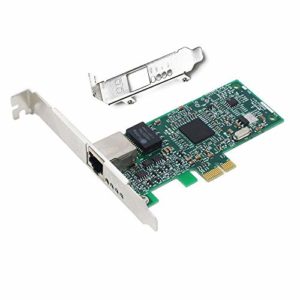
This controller is built on a small chip inside your PC. It uses PCI Express or integrated motherboard connections. It supports 10/100/1000 Mbps Ethernet speeds. The hardware can handle full-duplex communication, allowing data to send and receive at once. It includes features for error detection and correction. The controller’s design focuses on stable and consistent network performance.
Supported Operating Systems
The Realtek Gaming Gbe Family Controller works with many operating systems. It supports Windows versions from XP to Windows 11. Drivers are also available for some Linux distributions. Mac users may find limited support, depending on their system. Regular driver updates improve compatibility and fix issues. This wide support helps users connect easily across platforms.
Credit: www.driversupport.com
Installation And Setup
The Realtek Gaming GBE Family Controller needs proper installation and setup. This ensures your computer connects smoothly to the network. The process is simple and quick. Follow the steps carefully for the best results.
Driver Installation
Drivers let your computer talk to the Realtek controller. Start by checking if Windows already installed the driver. If not, visit the official Realtek website. Download the latest driver for your device model. Run the installer and follow on-screen instructions. Restart your computer to finish the installation. This step helps avoid connection problems later.
Configuring Network Settings
After installing drivers, set up your network. Open the Control Panel and go to Network Settings. Find the Realtek Gaming GBE Family Controller in the list. Click to open its properties. Set the IP address and DNS to automatic for most users. Manual settings are for advanced users or special networks. Save the changes and test the connection. This helps ensure stable internet access.
Troubleshooting Common Issues
Sometimes, issues occur despite correct installation. Check the cable and port for physical damage. Restart your router and computer to refresh connections. Update the driver if you see error messages. Use Windows Network Troubleshooter for automatic fixes. If problems persist, uninstall and reinstall the driver. These steps fix most common network problems fast.
Performance Optimization
Performance optimization is key for a smooth gaming experience with the Realtek Gaming GBE Family Controller. It helps your network run faster and more stable. Optimizing performance can reduce lag and improve response times. This section explores how to get the best from your network controller.
Improving Network Speed
The Realtek controller supports high-speed data transfer. To improve speed, update your drivers regularly. New drivers fix bugs and boost performance. Use a wired connection instead of Wi-Fi. Wired connections are faster and more reliable for gaming. Check your cable quality; a good cable prevents slowdowns.
Reducing Latency
Latency affects how quickly data moves between your PC and game servers. Lower latency means less delay in gameplay. You can reduce latency by closing background apps using the internet. Disable unnecessary downloads or streaming. Set your network priority to favor gaming traffic. This cuts down delays and keeps your game smooth.
Using Advanced Settings
The Realtek controller offers advanced settings for fine-tuning. Access the device manager to find these options. Enable features like Jumbo Frame and Flow Control for better data handling. Adjust interrupt moderation to balance speed and CPU usage. These tweaks help your network run more efficiently during games.
Compatibility And Updates
The Realtek Gaming GbE Family Controller needs regular updates and compatibility checks. This keeps it running smoothly and helps avoid network problems. Updates improve speed, fix bugs, and add new features. Compatibility ensures it works well with other hardware and software.
Firmware And Driver Updates
Firmware and driver updates are important for the controller’s performance. Drivers connect the controller to your operating system. Firmware controls the hardware’s basic functions. Regular updates fix errors and improve stability. Visit the Realtek website or use your PC’s update tool. Always choose the correct version for your system.
Compatibility With Other Devices
The controller must work with your motherboard, router, and other devices. Most modern devices support Realtek GbE controllers. Older hardware may have issues or slower speeds. Check your device specifications before installing the controller. Proper compatibility ensures better network performance and fewer connection drops.
Checking For Software Conflicts
Some software can interfere with the controller’s operation. Security programs or network management tools may cause conflicts. If you experience connection problems, try disabling or updating these programs. Use device manager to spot driver conflicts. Keeping software compatible helps maintain a stable connection.
Gaming Benefits
The Realtek Gaming GBE Family Controller brings clear benefits for gamers. It helps make your gaming connection smoother and faster. This controller works quietly in the background, improving how your network handles gaming data. Better network performance means less lag and more fun during play.
Enhanced Network Stability
This controller reduces network interruptions. It keeps your connection steady during long gaming sessions. Stable networks stop sudden drops that can ruin gameplay. Less interruption means you can focus fully on the game.
Prioritizing Gaming Traffic
The controller knows which data is for gaming. It gives priority to game-related data over other traffic. This reduces delays and lag spikes. Your game commands reach the server faster and more reliably.
Real-world Gaming Experience
Players notice better responsiveness and fewer connection issues. Matches run smoother with less delay. The controller helps your PC communicate quickly with game servers. This leads to a more enjoyable and competitive gaming experience.

Credit: www.youtube.com
Alternative Network Controllers
Alternative network controllers offer different options for connecting your PC to the internet. They vary in speed, reliability, and compatibility. Many gamers and regular users explore other brands to find the best fit for their needs. Understanding these alternatives helps you make a smart choice for your setup.
Comparing With Other Brands
Realtek is common and often built into many motherboards. Other brands like Intel and Killer provide strong competition. Intel controllers usually offer stable connections and good driver support. Killer network adapters focus on gaming and prioritize traffic for better online play. Speed and latency differ among brands, affecting your internet experience.
Pros And Cons
Realtek controllers are affordable and easy to find. They work well for daily tasks and casual gaming. The downside is their driver updates can be slow. Intel controllers offer better stability and faster updates but cost more. Killer adapters have gaming features but may not work well with all systems. Choosing depends on your budget and needs.
Choosing The Right Controller
Think about your internet speed and what you use your PC for. For simple browsing, Realtek is enough. For serious gaming or streaming, consider Intel or Killer. Check your motherboard compatibility before buying. Also, look for regular driver updates to keep your connection smooth. Pick a controller that fits your lifestyle and budget.

Credit: www.systweak.com
Frequently Asked Questions
What Is Realtek Gaming Gbe Family Controller?
Realtek Gaming GBE Family Controller is a network interface card driver. It manages Ethernet connections for smooth online gaming and internet use. This controller ensures stable, fast data transmission and reduces latency, enhancing gaming experiences on PCs with Realtek network hardware.
How Does Realtek Gaming Gbe Improve Gaming Performance?
It optimizes Ethernet data flow, reducing lag and packet loss. This controller prioritizes gaming traffic for faster response times. It also supports Gigabit Ethernet speeds, providing reliable and stable connections essential for competitive gaming.
Is Realtek Gaming Gbe Family Controller Necessary?
Yes, it is essential for PCs with Realtek network adapters. Without this driver, Ethernet connectivity may be unstable or slow. Installing it ensures proper communication between hardware and operating system, improving network performance.
How To Update Realtek Gaming Gbe Drivers?
You can update drivers via Device Manager or Realtek’s official website. Keeping the drivers updated fixes bugs, improves compatibility, and enhances network speed. Regular updates help maintain optimal gaming and internet connectivity.
Conclusion
The Realtek Gaming GBE Family Controller helps connect your computer to the internet. It allows smooth and fast data transfer. Many users find it reliable for gaming and daily tasks. Keeping its drivers updated improves performance. Knowing its role makes troubleshooting easier.
This controller supports stable network connections. It is common in many desktop and laptop computers. Understanding this device helps you get better internet speed. Simple and effective technology behind your network. A small part with a big impact on your online experience.
As an Amazon Associate, I earn from qualifying purchases.