Have you ever noticed the term “RF Channel” on your TV and wondered what it really means? Understanding the RF channel can help you get the best picture and sound quality from your television.
Whether you’re setting up an antenna or troubleshooting your cable connection, knowing how RF channels work puts you in control. You’ll discover exactly what an RF channel is, why it matters, and how it affects your TV viewing experience. Keep reading—you’re about to unlock a simple secret that can improve how you watch your favorite shows.
Credit: www.davidsenesac.com
Rf Channel Basics
Understanding RF channels helps you grasp how television signals work. These channels carry TV signals through airwaves. They are key to receiving shows on your TV without the internet.
RF channels have a simple but important role. They link your TV to broadcast stations and cable services. Let’s explore the basics of RF channels to see their function clearly.
What Is An Rf Channel
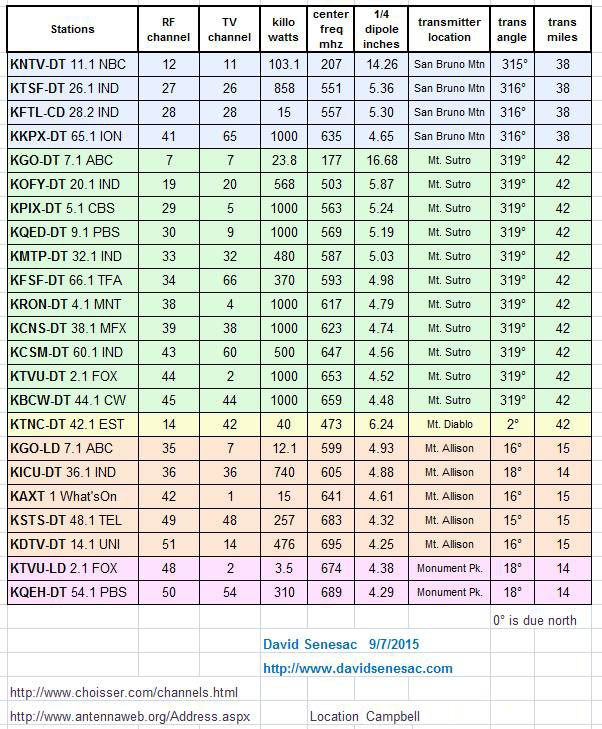
An RF channel is a specific frequency range for TV signals. It carries audio and video data. This frequency allows your TV to pick up signals from broadcasters.
Each channel has a unique number and frequency. This helps your TV tune to different stations. RF channels are different from virtual channels you see on screen.
How Rf Channels Work
RF channels send signals using radio waves. These waves travel through the air to your TV antenna. Your TV then decodes the signal into video and sound.
The antenna captures the RF signal from a nearby tower. The TV’s tuner selects the correct frequency. This process brings your favorite shows to the screen.
Common Uses Of Rf Channels
RF channels are widely used in broadcast TV. They deliver free over-the-air channels to homes. Many cable and satellite systems also use RF channels inside their networks.
RF channels support analog and digital TV signals. They also help connect devices like VCRs and gaming consoles. This makes them versatile in many home setups.

Credit: www.youtube.com
Tv Signal Types
Television signals carry the pictures and sounds you see and hear. These signals come in different forms. Understanding these types helps you know how TVs receive programs. The two main types are analog and digital signals.
Each type works in a unique way. They use radio frequency channels, or RF channels, to send signals through the air. This section explains the differences and the role of RF channels in TV signal transmission.
Analog Vs Digital Signals
Analog signals send information as continuous waves. These waves change smoothly over time. They can carry sound and pictures but are prone to noise and interference. This can cause a poor picture or sound quality.
Digital signals send information as a series of 0s and 1s. This makes the signal more stable and clear. Digital TV offers better picture quality and sound. It also allows more channels and features.
Many countries have moved from analog to digital broadcasting. This change improves TV viewing and allows new services like high definition.
Role Of Rf Channels In Signal Transmission
RF channels carry TV signals over the air. Each channel uses a specific frequency to avoid overlap. This frequency is part of the radio spectrum. TVs tune into these frequencies to receive programs.
RF channels work for both analog and digital signals. They act like invisible highways for data. The channel number you select on your TV matches one of these frequencies.
Without RF channels, TV signals could not travel from the broadcast tower to your screen. They are essential for wireless TV transmission.
Tuning To Rf Channels
Tuning to RF channels is the way your TV finds and shows broadcast signals. These channels carry audio and video through radio waves. Your TV needs to lock onto these signals to display the picture and sound properly. Understanding how to tune your TV helps you get the best viewing experience.
Tuning can be done manually or automatically. Each method has its use depending on your setup and needs. Learning to troubleshoot tuning problems can save time and improve your TV’s performance.
Manual Vs Automatic Tuning
Manual tuning lets you select channels by entering specific numbers. This is useful if you know the exact RF channel to watch. It gives you control over which channels appear.
Automatic tuning scans all available channels and saves the ones with strong signals. It is easier for beginners and works well for most users. The TV stores these channels for quick access later.
Manual tuning is best for fine adjustments. Automatic tuning is faster and covers more channels at once.
Troubleshooting Tuning Issues
Sometimes, the TV may not find certain RF channels. Check your antenna connection first. Loose or damaged cables can block signals.
Try rescanning channels if some do not show up. Interference from other devices can affect signal quality. Move electronics away from the TV or antenna.
If problems persist, adjust the antenna position. Higher and clearer locations often improve reception. Resetting the TV to factory settings can also help clear tuning errors.
Rf Channel Frequencies
RF channel frequencies are the specific radio waves used to send TV signals. Each TV channel uses a unique frequency range. This helps TVs tune into the right channel without interference. Understanding these frequencies is key to knowing how TV signals work and why some channels have better quality.
Frequency Bands For Tv Channels
TV channels use two main frequency bands: VHF and UHF. VHF stands for Very High Frequency. It covers channels 2 to 13. UHF means Ultra High Frequency. It covers channels 14 to 69. VHF signals travel farther but have lower bandwidth. UHF signals have higher bandwidth but shorter range. Different countries may use slightly different frequency ranges.
Impact Of Frequency On Signal Quality
Lower frequencies, like VHF, usually pass through walls better. This gives clearer signals inside buildings. Higher frequencies, like UHF, carry more data. This allows for better picture and sound quality. But UHF signals weaken faster over distance. Weather and obstacles can affect signal strength. Choosing the right frequency can improve your TV experience.
Rf Channel Interference
RF channel interference can cause problems with your TV signal. It happens when unwanted signals disrupt the RF channel’s frequency. This interference lowers picture quality and causes sound issues. Understanding the causes helps you reduce signal problems.
Common Sources Of Interference
Electrical devices like microwaves and cordless phones often cause interference. Nearby radio towers or cell phone signals can also disrupt your TV channel. Poor or damaged cables increase the chance of interference. Weather conditions, such as storms, may affect the signal too.
Minimizing Signal Disruption
Use high-quality coaxial cables to reduce interference. Keep electronic devices away from your TV antenna and cables. Adjust your antenna’s position to find a clearer signal. Installing a signal amplifier can boost weak signals. Regularly check and replace worn cables to maintain good reception.
Modern Uses Of Rf Channels
RF channels carry television signals over the air and through cables. They connect TVs with broadcast stations and service providers. Today, RF channels play a key role in many TV systems.
They support both traditional and digital TV services. RF channels help deliver clear images and sound. Their use extends beyond old antenna setups to new technology platforms.
Rf Channels In Cable And Satellite Tv
Cable TV uses RF channels to send many programs through one cable. Each channel has a unique frequency. This setup lets viewers choose from many shows without signal loss.
Satellite TV also relies on RF channels but sends signals from space. The signals reach a dish on the home roof. This system offers access to channels even in remote areas.
Both cable and satellite providers use RF channels to organize and deliver content efficiently. The channels help maintain signal quality and reduce interference.
Future Trends In Rf Channel Technology
New developments aim to make RF channels faster and more reliable. Digital compression techniques allow more channels in the same frequency space. This increases options without needing extra bandwidth.
Advanced modulation methods improve signal strength and reduce disruptions. These changes support higher quality video, including 4K and beyond. RF technology will also adapt to support smart TV features.
Wireless broadcasting using RF channels may expand with 5G and other networks. This will enable smoother streaming and interactive content. RF channels remain important in evolving TV systems worldwide.

Credit: www.pcmag.com
Frequently Asked Questions
What Does Rf Channel Mean On A Tv?
RF channel refers to the Radio Frequency channel used to transmit TV signals. It carries audio and video from the antenna or cable to the TV tuner.
How Do I Find The Rf Channel On My Tv?
You can find the RF channel by accessing your TV’s settings or tuning menu. It shows the channel number assigned for antenna or cable input.
Why Is Rf Channel Important For Tv Reception?
RF channels determine how TV signals reach your device. Correct RF channel tuning ensures clear picture and sound quality without interference.
Can I Change The Rf Channel On My Tv?
Yes, you can change the RF channel by rescanning channels in your TV settings. This updates the list based on available broadcast frequencies.
Conclusion
RF channel on TV carries signals through radio frequencies. It helps connect antennas to televisions. This channel lets you watch local broadcasts easily. Understanding it can improve your TV setup. It also explains why some channels need tuning. Knowing about RF channels saves time and effort.
This simple tech plays a key role in TV reception. Keep this in mind for better viewing experience.
As an Amazon Associate, I earn from qualifying purchases.