
Have you ever wondered where all the files, photos, and apps on your computer actually live? Understanding what computer storage is can change the way you use your device every day.
It’s not just about saving space; it’s about making sure your important data is safe, easy to access, and ready when you need it. You’ll discover the basics of computer storage, why it matters to you, and how knowing more can help you get the most out of your technology.
Keep reading, and you’ll unlock the secrets behind the storage that powers your digital life.
Credit: www.explainingcomputers.com
Computer Storage Basics
Understanding computer storage is key to using computers well. Storage holds all your data, files, and programs. It lets you save information to use later. Without storage, computers cannot keep data after they turn off. Storage comes in different types and sizes.
What Computer Storage Means
Computer storage means saving data inside a device. It keeps everything from photos to software. Storage holds data even when the computer is off. It differs from memory, which is temporary. Storage lets you keep large amounts of data safe.
How Storage Works
Storage works by writing data to a physical device. Hard drives and solid-state drives are common storage devices. Data is stored in tiny parts called bits. These bits combine to form files and programs. When you open a file, the computer reads these bits. Storage devices use magnets or flash memory to save data. This process makes sure your files stay safe.
Primary Storage Types
Primary storage is the main memory in a computer. It holds data and instructions that the CPU uses right now. This memory is fast and directly accessible by the processor. It plays a key role in a computer’s speed and performance. Different types of primary storage work together to make tasks run smoothly.
Random Access Memory (ram)
RAM is the most common type of primary storage. It stores data that the CPU needs at the moment. RAM is fast but temporary. When the computer turns off, RAM loses its data. More RAM allows a computer to run more programs at once without slowing down.
Cache Memory
Cache memory is a small, very fast type of memory. It stores copies of data from frequently used main memory locations. The CPU checks cache first before RAM. This reduces the time needed to access data. Cache helps speed up processing by keeping important data close to the CPU.
Registers
Registers are tiny storage areas inside the CPU. They hold data and instructions the CPU is currently working on. Registers are the fastest type of memory. They store numbers, addresses, and instructions for quick access. Their small size means they hold only a little data but work at lightning speed.
Secondary Storage Options
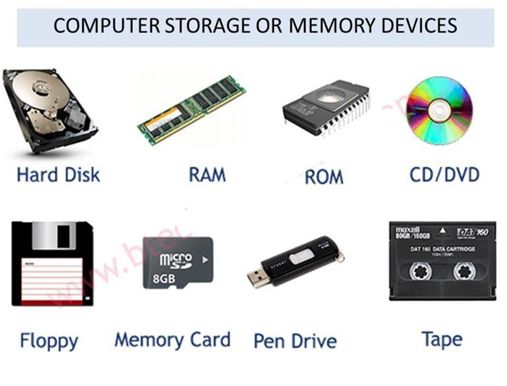
Secondary storage holds data permanently. It keeps files even when the computer is off. This storage type is crucial for saving documents, photos, and software. It offers more space than primary memory and protects data safely.
Several devices serve as secondary storage. Each has unique features, speed, and capacity. Users pick options based on needs and budget. Understanding these helps choose the right storage device.
Hard Disk Drives (hdd)
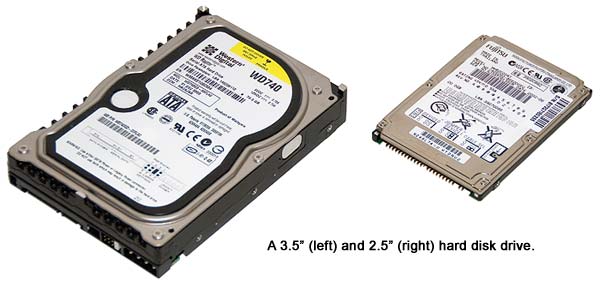
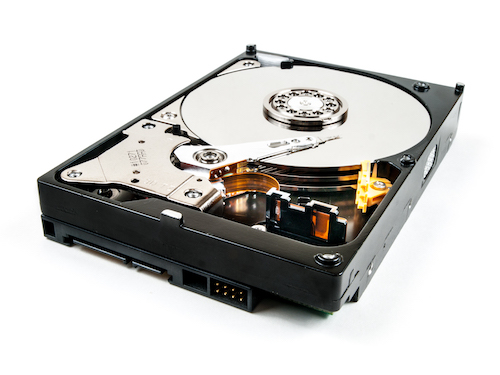
HDDs store data on spinning metal disks. A read/write head moves to access information. They offer large storage at a low cost. HDDs are slower than some newer devices but reliable for many uses.
Solid State Drives (ssd)
SSDs use memory chips to store data. They have no moving parts, which makes them fast. SSDs start computers quickly and load files fast. They cost more than HDDs but give better speed and durability.
Optical Drives
Optical drives read data from CDs, DVDs, or Blu-rays. They use lasers to access information on discs. These drives are less common now but still useful for media playback and backups. Optical discs provide portable storage options.
Flash Drives
Flash drives are small, portable storage devices. They plug into USB ports for easy use. Flash drives hold moderate data and work well for quick transfers. They are popular for sharing files and temporary storage.
Credit: medium.com
Cloud Storage Solutions
Cloud storage solutions let you save data on the internet instead of your computer. This method stores files on remote servers managed by providers. You can access your files anytime and from any device with internet access.
Storing data in the cloud removes the need for physical storage devices. It offers more space and easier sharing options. Many people and businesses use cloud storage for backup and collaboration.
Benefits Of Cloud Storage
Cloud storage keeps data safe from hardware failures. It reduces the risk of losing important files. Access to files is fast and simple from anywhere in the world.
It helps save money by cutting costs on buying storage devices. Cloud services often offer automatic backups and file syncing. Sharing files with others is easier and quicker.
Popular Cloud Storage Providers
Google Drive offers free storage and easy integration with other Google apps. Microsoft OneDrive works well with Windows and Office programs. Dropbox is known for its simple interface and reliable syncing.
Amazon Drive provides large storage options for photos and documents. iCloud is popular among Apple users and syncs with all Apple devices. These providers offer different plans to fit various needs.
Storage Performance Factors
Storage performance is a key part of how computers work. It affects how fast data can be saved and accessed. Many factors impact this performance. Knowing these helps choose the right storage for your needs.
Speed And Latency
Speed measures how fast data moves between storage and computer. High speed means quick file transfers and faster programs. Latency is the delay before data starts moving. Low latency means less waiting time. Both speed and latency affect overall system response.
Capacity And Scalability
Capacity is the amount of data a storage device can hold. Larger capacity means more files and programs stored. Scalability is how easily storage can grow over time. Good scalability allows adding more space without changing systems. This keeps storage flexible for future needs.
Durability And Reliability
Durability means how well storage withstands wear and damage. Reliable storage keeps data safe without errors. It prevents data loss and system crashes. Durable and reliable storage ensures long-term data protection and smooth computer use.
Credit: www.rgvelectricalsupply.com
Choosing The Right Storage
Choosing the right computer storage is important for a smooth experience. Storage affects how fast your system works and how much data you can keep. Picking the correct type helps avoid future problems and saves money. This section explains how to choose storage based on your needs, budget, and future plans.
Based On Usage Needs
Think about what you do with your computer. For simple tasks like browsing and writing, basic storage works fine. If you edit videos or play games, choose faster and larger storage. More storage space matters if you store many files or programs. Match storage speed and size to your daily activities.
Budget Considerations
Storage prices vary a lot. SSDs cost more but are faster. HDDs offer more space for less money but are slower. Balance cost and performance. Buy the best storage you can afford without overspending. Sometimes, a mix of SSD and HDD fits both speed and budget.
Future-proofing Your Storage
Think about future needs before buying. Data grows over time. Choose storage that can expand or upgrade easily. Opt for newer technology for longer use. Planning ahead saves time and money later. Pick storage that keeps your system ready for new programs and files.
Benefits Of Modern Storage
Modern computer storage offers many benefits that improve how we save and use data. It helps users access files faster, keep information safer, and save money over time. These improvements make storage more reliable and practical for daily use.
Improved Data Access
Modern storage devices work much faster than older ones. They reduce waiting time when opening or saving files. This speed helps both individuals and businesses finish tasks quickly. Quick access also supports smooth running of software and applications.
Enhanced Security
New storage solutions often include strong security features. They protect data from theft and accidental loss. Encryption and backup options keep files safe from hackers and hardware failure. Users can trust their important information is well guarded.
Cost Efficiency
Modern storage is more affordable than ever. It offers large space without high prices. Energy-efficient designs lower electricity costs. This makes it easier for users to store more data without overspending.
Frequently Asked Questions
What Is Computer Storage Used For?
Computer storage saves digital data like files, programs, and system information. It allows quick access and retrieval when needed. Storage can be temporary or permanent, enabling smooth device performance and data management.
What Are Types Of Computer Storage?
Computer storage includes primary (RAM) and secondary (HDD, SSD) types. Primary storage is fast but volatile. Secondary storage offers larger, permanent data retention. External storage options like USB drives also exist for portability.
How Does Computer Storage Affect Performance?
Storage speed impacts how fast data loads and saves. Faster storage like SSDs improves boot times and application responsiveness. Slow storage devices can cause delays and reduce overall system efficiency.
What Is The Difference Between Ram And Storage?
RAM is temporary memory used for active tasks and processes. Storage holds data permanently or long-term. RAM is fast but loses data when powered off, while storage retains data without power.
Conclusion
Computer storage holds data for easy access and use. It comes in many forms like hard drives, SSDs, and flash drives. Each type has different speeds and sizes. Choosing the right storage depends on your needs. Good storage helps your computer run smoothly.
It keeps your files safe and ready to use. Understanding storage helps you make smart choices. Keep your data organized and accessible. Storage is a key part of every computer system. It supports work, learning, and fun.
As an Amazon Associate, I earn from qualifying purchases.

