
Have you ever wondered why your computer seems fast one moment and slow the next? The secret lies in understanding the difference between computer memory and computer storage.
Knowing how these two work can help you make smarter choices when buying or upgrading your device. You’ll discover what sets memory and storage apart, why each matters, and how they impact your everyday computing experience. Keep reading—you’re about to unlock the key to making your computer work better for you.

Credit: www.youtube.com
Memory Vs Storage
Understanding the difference between computer memory and computer storage is important. Both play key roles in how computers work. They store data, but in very different ways. Knowing their differences helps users choose the right devices and improve computer speed.
Basic Concepts
Memory, also called RAM, is a temporary place for data. It holds information the computer uses right now. Storage keeps data for a long time. It saves files, programs, and the operating system. Memory loses data when power goes off. Storage keeps data safe without power.
Primary Functions
Memory helps the computer work fast. It quickly reads and writes data needed for tasks. Storage holds large amounts of data permanently. It stores photos, videos, and apps. Memory acts like a desk for current work. Storage is like a filing cabinet for all data.
Types Of Computer Memory
Computer memory is a critical part of how a computer works. It holds data and instructions that the CPU uses right away. There are different types of memory, each with its own role. Understanding these types helps you know how computers process information quickly.
Ram
RAM stands for Random Access Memory. It is the main memory used by the computer to store data temporarily. RAM is fast but loses all data when the power turns off. It helps the computer run programs and access data quickly.
Cache
Cache is a small, very fast memory located inside the CPU. It stores frequently used data and instructions. Cache helps the CPU work faster by reducing the time to get data from the main memory. It acts as a shortcut for data access.
Rom
ROM means Read-Only Memory. It holds permanent data needed to start the computer. Unlike RAM, data in ROM does not disappear when the power is off. It stores important instructions that help the computer boot up safely.
Types Of Computer Storage
Computer storage holds data and files for long periods. It keeps information safe when the computer is off. Storage comes in different types, each with unique features. Knowing these types helps choose the right storage for your needs.
Hdd
HDD stands for Hard Disk Drive. It uses spinning disks to store data. A mechanical arm reads and writes information. HDDs offer large storage at a low cost. They are slower than newer storage types but work well for many tasks.
Ssd
SSD means Solid State Drive. It stores data on flash memory chips. SSDs have no moving parts, making them faster and more durable. They start up computers quickly and load files fast. SSDs cost more but improve overall speed and performance.
Optical Drives
Optical drives use discs like CDs, DVDs, or Blu-rays. A laser reads and writes data on these discs. They are less common today but still useful for media storage. Optical drives are good for music, movies, and backups.
Speed And Performance
Speed and performance play a key role in how computers work. Memory and storage affect this in different ways. Understanding their speed helps explain why they are not the same. Both have unique features that impact how fast data is handled.
Access Times
Access time is how fast data can be read or written. Memory, like RAM, has very low access times. It can retrieve data almost instantly. Storage devices, like hard drives or SSDs, have higher access times. They take longer to find and deliver data. This difference means memory handles tasks quicker than storage.
Data Transfer Rates
Data transfer rate measures how much data moves in a set time. Memory usually has higher transfer rates than storage. RAM can transfer large amounts of data quickly. Storage devices vary; SSDs are faster than traditional hard drives. Still, they often transfer data slower than memory. This affects how fast programs run and files open.
Volatility Differences
Volatility differences are key to understanding how computer memory and storage work. These differences affect how data is kept and lost. Memory and storage serve different purposes because of their volatility traits.
Volatile Memory
Volatile memory needs power to keep data. When the computer turns off, all data in this memory is lost. It works very fast, helping the computer run programs smoothly. RAM is a common type of volatile memory. It stores data temporarily while you use a computer. This speed helps your system respond quickly. But it cannot keep data without power.
Non-volatile Storage
Non-volatile storage keeps data even without power. It holds files, photos, and programs safely for a long time. Examples include hard drives and solid-state drives. This storage is slower than memory but stores much more data. It lets you save information permanently. You can turn off your computer and still keep your files. This is the main difference from volatile memory.
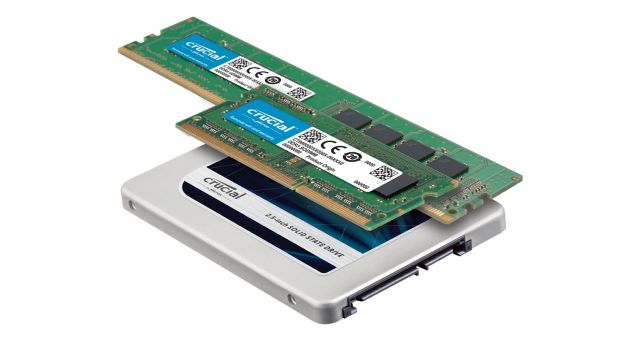
Credit: www.crucial.com
Capacity And Cost
Capacity and cost are two key factors that separate computer memory and computer storage. They affect how much data each can hold and how much they cost to buy. Understanding these differences helps in choosing the right parts for your computer.
Typical Sizes
Computer memory, also called RAM, usually comes in sizes from 4GB to 64GB. It holds data temporarily for quick access. Storage, like hard drives or SSDs, offers much larger space. Common sizes range from 256GB to several terabytes (TB). Storage keeps data even when the computer is off.
Price Comparison
Memory is more expensive per gigabyte than storage. This is because memory works faster and uses special chips. Storage devices cost less for bigger sizes. People pay more for memory to improve speed. Storage is chosen based on how much data you want to save.
Use Cases
Computer memory and storage serve different roles in handling data. Understanding their use cases helps clarify their functions. Both are vital but serve unique purposes in a computer system.
Temporary Data Handling
Computer memory, like RAM, holds data only while the device is on. It stores information the CPU needs quickly. This helps programs run smoothly and fast. Once the computer powers off, this data disappears. Memory allows quick access to active tasks and applications.
Long-term Data Preservation
Computer storage keeps data even when the power is off. Hard drives and SSDs save files, photos, and software. This data stays safe for future use. Storage holds everything from your operating system to personal documents. It provides a permanent place for important information.
Future Trends
The future of computer memory and storage is full of exciting changes. New technologies will make devices faster, smaller, and more efficient. These advances will impact how we use computers daily. Understanding these trends helps us see what to expect next.
Emerging Memory Technologies
Memory technology is evolving quickly. New types like MRAM and RRAM offer faster speeds and lower power use. These memories can keep data even when the power is off. They help computers start up faster and work better. Scientists work on making these technologies cheaper and more reliable.
Storage Innovations
Storage is also changing. Solid-state drives (SSD) keep improving, becoming larger and faster. New storage methods use light or DNA to store data. These ideas can hold huge amounts of data in tiny spaces. Storage devices will become more durable and use less energy. This helps both consumers and businesses manage data better.

Credit: www.hp.com
Frequently Asked Questions
What Is Computer Memory And How Does It Work?
Computer memory, also called RAM, temporarily stores data for quick access. It helps the CPU process tasks faster by holding active information during use.
How Does Computer Storage Differ From Memory?
Storage retains data permanently, even when powered off. Memory is temporary and clears data once the computer shuts down.
Why Is Memory Faster Than Storage Devices?
Memory uses electronic circuits for instant data access. Storage devices like hard drives rely on mechanical parts, making them slower.
Can Computer Storage Affect System Performance?
Yes, storage speed impacts data loading times. Faster storage like SSDs improves overall system responsiveness compared to traditional hard drives.
Conclusion
Computer memory and storage serve different roles in a computer system. Memory holds data temporarily for quick access. Storage keeps data safe for a long time. Memory is fast but limited in size. Storage is slower but can hold much more.
Understanding these differences helps choose the right device. Both work together to make computers run smoothly. Knowing this makes using technology easier and clearer.
As an Amazon Associate, I earn from qualifying purchases.

