
Have you ever taken a photo or video where some parts look too bright while others are too dark? That’s a common problem with cameras, but there’s a feature that can fix it—WDR.
If you’ve seen “WDR” on your camera settings and wondered what it means or how it can improve your shots, you’re in the right place. Understanding WDR can change the way you capture moments, making your pictures clearer and more balanced.
Keep reading to discover what WDR is and why it matters for your camera.
What Wdr Means
Understanding WDR on a camera helps you see clearer images in difficult lighting. It improves the picture quality by balancing bright and dark areas. This feature is useful in many situations, especially when light varies a lot in one scene.
Basic Concept
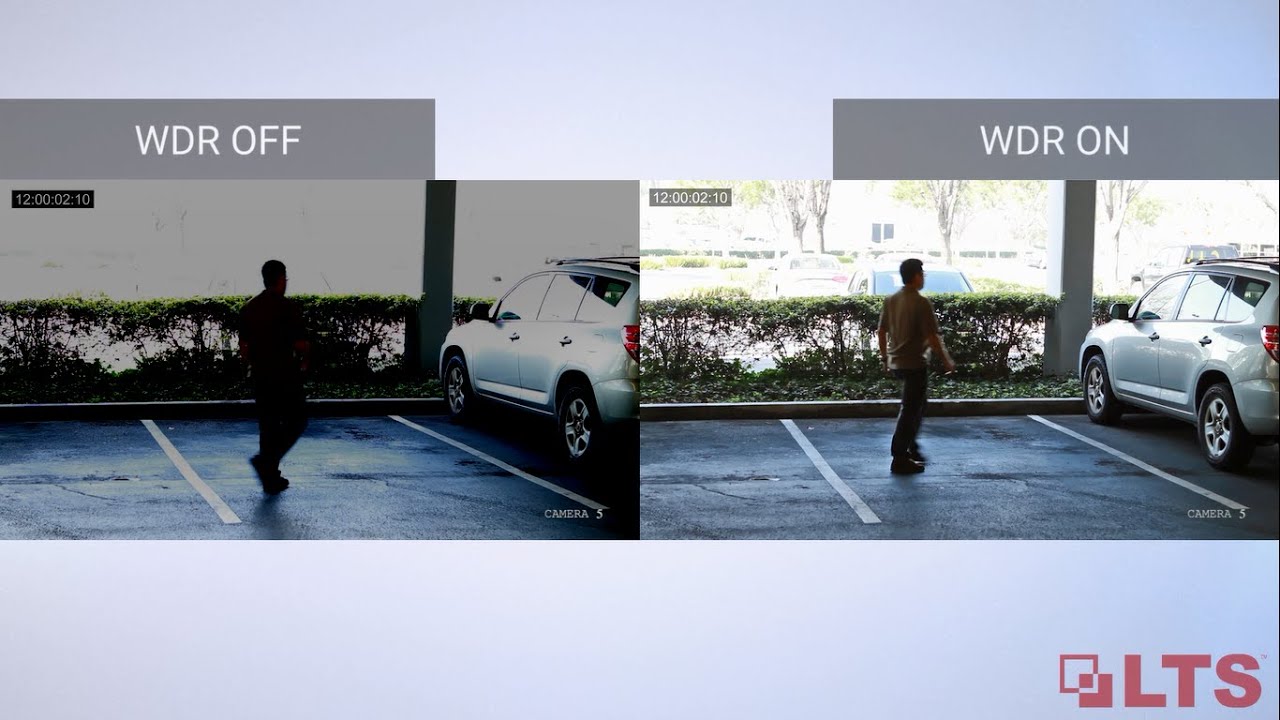
WDR stands for Wide Dynamic Range. It is a camera technology that captures details in both very bright and very dark areas. Normally, cameras struggle to show both ends well. WDR fixes this by combining different exposures into one image. This makes shadows and highlights visible at the same time.
Why It Matters
WDR is important for places with uneven lighting. For example, entrances with sunlight outside and shadow inside. Without WDR, one part will look too bright or too dark. WDR helps cameras show clear faces and objects in such spots. It makes video footage more useful and reliable.

Credit: www.youtube.com
How Wdr Works
Wide Dynamic Range (WDR) helps cameras capture clear images in scenes with both bright and dark areas. It works by adjusting the light levels to show details in shadows and highlights. Understanding how WDR works reveals why it improves image quality in tricky lighting.
Light Balancing Techniques
Cameras with WDR use light balancing to manage brightness differences. They capture multiple images at different exposures. One image may be darker to save bright areas. Another image is lighter to reveal shadow details. The camera then combines these images into one balanced photo. This method prevents parts of the image from being too dark or too bright.
Image Processing Methods
After capturing images, the camera processes them to create a clear picture. It uses algorithms to merge the best parts of each photo. The camera reduces glare and bright spots. It also enhances details in dark areas. This processing helps produce natural-looking images with good contrast. The final image shows more details than a single exposure could capture.
Types Of Wdr
Wide Dynamic Range (WDR) technology helps cameras capture clear images in scenes with both bright and dark areas. There are two main types of WDR: Digital WDR and True WDR. Each type works differently to improve image quality in tricky lighting conditions.
Digital Wdr
Digital WDR uses software to adjust the brightness in different parts of the image. It brightens dark spots and tones down bright spots after the picture is taken. This process helps balance the light but can sometimes reduce the image quality. Digital WDR is common in budget cameras because it is cheaper to implement.
True Wdr
True WDR uses hardware to take multiple photos at different exposures at the same time. It then combines these images into one balanced photo. This method keeps more detail in both dark and bright areas. True WDR usually produces better and clearer images. It is common in higher-end cameras used for security and professional photography.
Credit: www.youtube.com
Benefits Of Wdr In Cameras
Wide Dynamic Range (WDR) in cameras helps capture clear images in different lighting conditions. It balances bright and dark areas in a photo or video. This feature is important for places with mixed lighting, like entrances or parking lots. WDR improves the quality of images and videos, making details easier to see.
Improved Image Clarity
WDR reduces glare and bright spots in photos. It prevents areas from looking washed out or too dark. This makes the overall picture sharper and clearer. Clear images help identify people and objects better. Cameras with WDR perform well in both bright sunlight and shadows.
Enhanced Detail In Shadows And Highlights
WDR brings out details hidden in dark and bright spots. Shadows no longer hide important features. Bright parts do not lose their detail due to overexposure. This balance helps in security and monitoring tasks. It also makes photos look more natural and true to life.
When To Use Wdr
Wide Dynamic Range (WDR) helps cameras handle tricky light situations. It balances bright and dark areas in a photo. This makes details clear on both ends. Knowing when to use WDR improves your photo quality. Some scenes need WDR to show everything clearly.
High Contrast Scenes
High contrast scenes have both bright and dark spots. For example, a room with bright windows and dark corners. Without WDR, bright areas may look too bright. Dark areas may lose details. WDR balances these areas. It keeps details visible in both bright and dark parts.
Use WDR when capturing scenes with sunlight and shadows. It helps avoid washed-out lights or deep shadows. This makes your image look natural and clear. Perfect for outdoor photos or places with uneven lighting.
Low Light Conditions
Low light conditions make it hard to see details. Shadows become darker and colors fade. WDR brightens dark parts without overexposing bright spots. This keeps the image balanced.
Use WDR in dim rooms or at night. It improves visibility and sharpness. WDR helps cameras show more detail in poor light. This is useful for security cameras and nighttime photography.

Credit: microsegur.com
Choosing A Camera With Wdr
Choosing a camera with WDR (Wide Dynamic Range) improves image quality in tricky lighting. WDR helps cameras capture details in both bright and dark areas. This feature is key for security cameras and outdoor use. It ensures clear images even with shadows or strong backlight.
Knowing what to check helps pick the right camera with WDR. Focus on features that match your needs. Also, find models praised for effective WDR performance. This section guides you through the main points to consider.
Key Features To Look For
Check the WDR range or the number of stops. Higher stops mean better detail in bright and dark spots. Look for cameras with real-time WDR, not just software-based. Real-time WDR gives smoother, clearer images.
Resolution matters. Higher resolution cameras show finer details. Night vision combined with WDR enhances low-light performance. A good sensor size also improves image quality. Consider lens quality for sharpness and field of view.
Best Camera Models With Wdr
Some models stand out for strong WDR features. Brands like Hikvision, Dahua, and Axis offer reliable options. These cameras handle harsh lighting well and deliver clear images.
Examples include Hikvision DS-2CD2143G0-I and Dahua IPC-HFW5831E-ZE. Axis P5635-E is another solid choice. These cameras balance price and performance. They suit home security and business needs.
Tips For Optimizing Wdr Settings
Optimizing WDR settings helps capture clear images in bright and dark areas. It balances light to show details in shadows and highlights. Proper adjustment avoids washed-out or too dark pictures. Simple steps improve your camera’s performance in tricky lighting.
Adjusting Wdr Levels
Start by setting the WDR level to low. Check how the image looks in bright spots and shadows. Increase WDR gradually to reduce glare and brighten dark areas. Watch the picture for natural colors and clear details. Too much WDR can make the image look flat or noisy. Find the level where the image looks balanced and sharp.
Balancing Exposure
Exposure controls how much light hits the camera sensor. Adjust exposure to avoid overexposed bright areas. Lower exposure if bright spots appear washed out. Raise exposure if dark areas lose details. Use exposure settings with WDR for the best results. Proper balance keeps the image clear without losing parts in light or dark.
Frequently Asked Questions
What Does Wdr Mean On A Camera?
WDR stands for Wide Dynamic Range. It helps cameras capture clear images in scenes with both bright and dark areas. WDR balances light levels to reveal details in shadows and highlights, improving overall picture quality.
How Does Wdr Improve Camera Image Quality?
WDR enhances image quality by adjusting exposure in high-contrast scenes. It reduces overexposed bright spots and brightens dark areas. This results in balanced, detailed images even in challenging lighting conditions.
When Should I Use Wdr On My Camera?
Use WDR in environments with strong lighting contrasts. It’s ideal for outdoor scenes, entrances, or areas with backlighting. WDR ensures you capture clear details regardless of uneven lighting.
Does Wdr Affect Camera Performance Or Speed?
WDR may slightly increase processing time but usually does not impact camera speed significantly. Modern cameras handle WDR efficiently, maintaining smooth video without noticeable lag.
Conclusion
WDR helps cameras capture clear images in bright and dark areas. It balances light to show details in shadows and highlights. This feature improves video quality in tricky lighting conditions. Cameras with WDR work well indoors and outdoors. Choosing a camera with WDR can make a big difference in your footage.
Understanding WDR helps you pick the right camera for your needs. Clear, balanced images are important for good security or video. WDR makes your camera more useful every day.
As an Amazon Associate, I earn from qualifying purchases.
