
Have you ever wondered, “What size is my laptop?” Knowing your laptop’s size is more important than you might think. It affects how easily you can carry it, which accessories fit, and even how comfortable it is to use every day.
You’ll discover simple ways to measure your laptop and why those numbers matter for your work, travel, and entertainment. Keep reading to find out exactly what your laptop size means for you.

Credit: www.youtube.com
Laptop Size Basics
Laptop size is measured by screen size, shown in inches. It is the diagonal length of the screen from corner to corner.
The physical size of the laptop is larger than the screen size. It includes the laptop’s body, keyboard, and frame.
| Screen Size (inches) | Approximate Width (inches) | Approximate Depth (inches) |
|---|---|---|
| 11.6″ | 11.0″ | 7.5″ |
| 13.3″ | 12.0″ | 8.0″ |
| 15.6″ | 14.0″ | 9.5″ |
| 17.3″ | 16.0″ | 10.5″ |
Aspect ratio is the screen’s width compared to height. Common ratios are 16:9 and 16:10.
Aspect ratio changes how tall or wide the screen looks. This affects how much space the laptop takes.

Credit: geekscallout.co.uk
Measuring Your Laptop
Start by measuring the screen size diagonally from one corner to the opposite corner. This gives the size in inches.
Next, measure the width of the laptop from left to right. Then, measure the depth from front to back. Finally, measure the thickness from the bottom to the top when the laptop is closed.
Use a ruler or a measuring tape for accuracy. A soft tape measure works well for curved edges.
Write down each measurement to compare models or find laptop bags. Knowing these sizes helps with buying accessories or fitting the laptop in a backpack.
Choosing The Right Size
Portability is key for many laptop users. Smaller laptops, like 11 to 13 inches, are light and easy to carry. They fit well in backpacks and bags. Larger laptops, 15 inches or more, tend to be heavier and less portable. Choose size based on how much you move with your laptop daily.
There is a clear link between size and performance. Bigger laptops often have better cooling. This helps powerful parts run well without overheating. Smaller laptops may have less power but last longer on battery. Think about what performance you need before picking a size.
| Use Case | Recommended Size | Why? |
|---|---|---|
| Travel and School | 11-13 inches | Lightweight and easy to carry |
| Work and Everyday Use | 14-15 inches | Good balance of screen size and performance |
| Gaming and Design | 17 inches or more | Larger screen and better cooling |
Size Categories Explained
Ultraportable laptops usually have screens between 11 and 13 inches. They are light and easy to carry. Perfect for travel or school. Battery life is often long, but power is less than bigger laptops.
Standard laptops have screens from 14 to 16 inches. These are good for everyday use. They balance size, weight, and performance well. Many models fit this category, suitable for work and play.
Gaming and desktop replacements are larger, with screens over 17 inches. Heavy and less portable, they offer strong performance. These laptops can handle games and heavy software easily.
Impact Of Size On Features
Laptop size affects many important features. Smaller laptops often have shorter battery life because their batteries are smaller. Larger laptops usually have bigger batteries, so they last longer without charging. Battery life depends on size but also on how the laptop is used.
Keyboards and trackpads vary with size. Big laptops offer more space, making typing and using the trackpad easier. Smaller laptops may have compact keyboards, which can feel cramped for some users. Comfort depends on how much space is available.
| Feature | Small Laptop | Large Laptop |
|---|---|---|
| Battery Life | Shorter, smaller battery | Longer, bigger battery |
| Keyboard & Trackpad | Smaller, less space | Bigger, more comfortable |
| Connectivity Options | Fewer ports | More ports and slots |
Port options also change with size. Smaller laptops have fewer ports. Large laptops often include more USB, HDMI, and other connections. This helps when many devices need to connect at once.
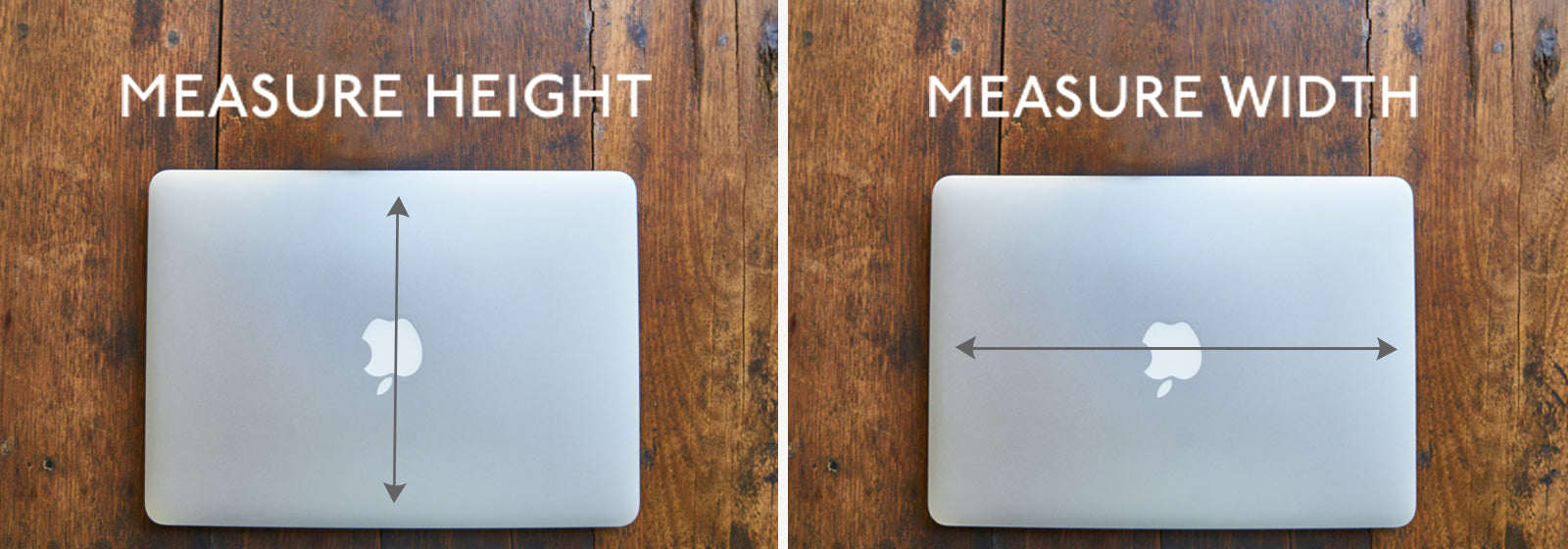
Credit: knomo.com
Tips For Trying Laptops In-store
Check the laptop’s weight by holding it. Is it light enough to carry daily? Test how it feels on your lap. A heavy laptop can be uncomfortable for long use.
Look at the screen size and quality. A bigger screen shows more details but can make the laptop heavier. Smaller screens are easier to carry but may strain your eyes.
| Aspect | What to Check |
|---|---|
| Portability | Weight, size, thickness, how it fits in your bag |
| Screen | Size, brightness, resolution, clarity |
| Physical Feel | Keyboard comfort, hinge strength, material quality |
Adjusting Size Preferences Over Time
Changes in daily habits often affect laptop size choices. Smaller laptops suit those who travel a lot. Bigger screens help with work or study at home. Over time, needs may shift from portability to screen space or vice versa.
New technology also changes size preferences. Thin laptops with strong power are now common. Touchscreens and 2-in-1 designs offer more options. These trends can make older laptops feel bulky or outdated.
Some people like to upgrade to a bigger laptop for better performance. Others may downsize to save space or carry less weight. Choosing the right size depends on personal comfort and how the laptop will be used daily.
Frequently Asked Questions
How Do I Measure My Laptop Screen Size?
Measure diagonally from one corner of the screen to the opposite corner. This gives the laptop’s screen size in inches. Avoid including the bezel or frame in your measurement.
What Are Common Laptop Sizes Available?
Common laptop screen sizes range from 11 to 17 inches. Popular sizes include 13. 3, 15. 6, and 17 inches. Choose based on portability and usage needs.
Does Laptop Size Affect Performance?
Laptop size mainly affects portability and screen space, not performance. Performance depends on hardware like the processor, RAM, and storage, not size.
How To Find My Laptop Size Without Measuring?
Check your laptop’s model number online or look in system settings. Manufacturer websites list screen sizes based on model numbers for quick reference.
Conclusion
Knowing your laptop size helps you choose the right device. It affects portability, screen view, and comfort. Measure the screen diagonally from corner to corner. Compare sizes before buying to match your needs. Small laptops are easy to carry but have smaller screens.
Larger laptops show more detail but can be heavy. Now, you can find the best laptop size for you. Make smart choices with simple measurements. Your perfect laptop size is just a few steps away.
As an Amazon Associate, I earn from qualifying purchases.

