
If you own a Sony Bravia TV, you know how important great sound is to your viewing experience. But with so many soundbars on the market, choosing the right one can feel overwhelming.
You want a soundbar that not only delivers clear, powerful audio but also works seamlessly with your TV. You’ll discover which soundbars are compatible with your Sony Bravia TV. By the end, you’ll feel confident in picking the perfect soundbar to upgrade your home entertainment setup.
Keep reading to find the best match for your TV and hear every scene like never before.

Credit: www.amazon.com
Sony Bravia Tv Audio Features
Sony Bravia TVs come with several audio features that affect soundbar compatibility. Understanding these features helps you pick the right soundbar. Sony aims to provide clear, balanced sound for movies, music, and games.
Knowing the supported audio formats and connection options is key. Also, keep in mind the limits of the TV’s built-in speakers. This knowledge ensures you choose a soundbar that matches your TV’s capabilities.
Supported Audio Formats
Sony Bravia TVs support popular audio formats like Dolby Digital and DTS. Many models also handle Dolby Atmos for surround sound. PCM audio is commonly supported for clear stereo sound. Check your TV model to confirm which formats it supports. This helps avoid sound issues with your soundbar.
Connectivity Options
Most Sony Bravia TVs offer HDMI ARC or eARC ports. These let you connect soundbars with high-quality audio. Optical digital audio output is another common option. Some models support Bluetooth for wireless soundbars. Using the right connection improves audio quality and sync.
Built-in Sound Limitations
Sony Bravia built-in speakers are often small and less powerful. They may lack deep bass and rich sound detail. This can limit the experience during movies or music playback. Adding a soundbar can significantly improve sound clarity and volume. A compatible soundbar complements the TV’s audio system well.
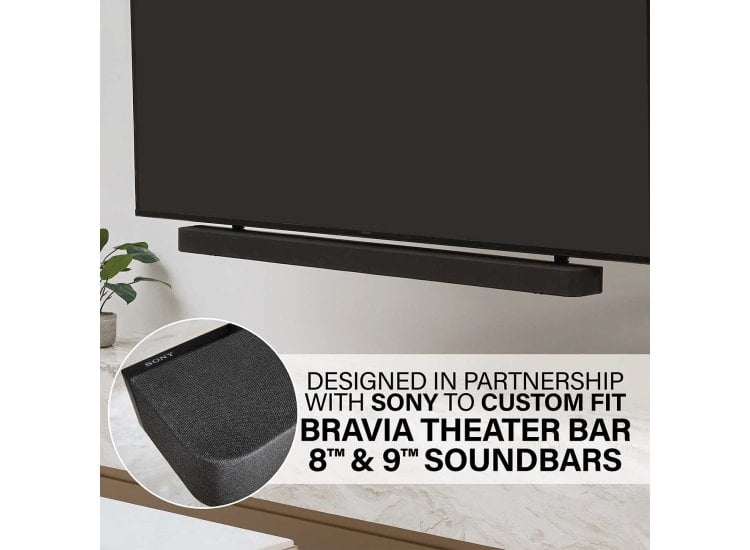
Credit: www.abt.com
Key Factors For Soundbar Compatibility
Choosing the right soundbar for your Sony Bravia TV means understanding key compatibility factors. These factors help ensure clear sound, easy setup, and smooth use. Knowing them saves time and avoids frustration.
Soundbar compatibility depends on the way the devices connect and work together. The type of connection affects sound quality and ease of use. Some connections support better audio and fewer delays.
Syncing the sound with the picture is another important factor. If audio and video are out of sync, it hurts the watching experience. Good soundbars offer settings to fix this issue.
Controlling the soundbar with your TV remote adds convenience. Not all soundbars support this feature. Check for remote control integration to make operation simple.
Connection Types To Consider
Sony Bravia TVs support multiple audio connections. HDMI ARC or eARC is the best choice. It carries high-quality sound and allows one remote to control both devices.
Optical audio cables are also common. They offer good sound but lack control features. Bluetooth is wireless but may cause small delays in sound.
Check your TV’s ports before buying. Match the soundbar input to the TV output for smooth setup.
Audio Sync And Lip-sync Issues
Sound delay can ruin the viewing experience. It happens when audio and video are not in sync. Choose a soundbar with audio delay adjustment settings.
Some TVs have built-in options to fix lip-sync problems. Test your setup before finalizing to avoid frustration during use.
Remote Control Integration
Using one remote for TV and soundbar is easier. HDMI ARC often supports this feature. It lets the TV remote adjust soundbar volume and power.
Some soundbars also work with universal remotes. Check product details for compatibility with Sony Bravia’s remote system.
Remote integration reduces the number of devices on your coffee table. It makes controlling your home theater simpler and faster.
Top Soundbars For Sony Bravia Tvs In 2026
Choosing the right soundbar for your Sony Bravia TV enhances your viewing experience. In 2026, many soundbars offer clear sound and deep bass. Compatibility with Sony Bravia TVs is crucial for easy setup and better sound quality. Below are top soundbars that fit different needs and budgets.
Premium Soundbar Choices
For those seeking high-end audio, premium soundbars provide rich, immersive sound. Models like the Sony HT-A7000 deliver powerful surround sound and support Dolby Atmos. These soundbars connect seamlessly with Bravia TVs via HDMI eARC. They also offer voice control and smart features. Premium options suit large rooms and movie lovers who want theater-like sound.
Budget-friendly Options
Affordable soundbars still improve TV audio significantly. The Vizio V-Series and TCL Alto 6+ are popular budget picks. These models offer clear dialogue and decent bass for their price. They connect easily using Bluetooth or optical cables. Budget soundbars work well in small to medium rooms. Great for those who want better sound without spending much.
Best Soundbars For Small Rooms
Small spaces need compact soundbars with clear sound. The Bose Solo 5 and JBL Bar Studio fit well in tight areas. They do not overpower the room but enhance TV audio clearly. These soundbars use simple connections like Bluetooth and AUX. They are easy to place on shelves or desks. Perfect for bedrooms or small living rooms.
Setup Tips For Optimal Performance
Setting up your soundbar with a Sony Bravia TV is key for clear, rich audio. Proper setup ensures the best sound quality and fewer connection problems. Follow these tips for easy, effective setup and improved performance.
Connecting Via Hdmi Arc/earc
Use the HDMI ARC or eARC port on your TV and soundbar. This connection sends audio and controls with one cable. Plug the HDMI cable into the ARC port labeled on both devices. Turn on HDMI-CEC or BRAVIA Sync in your TV settings. This allows volume control using your TV remote. ARC supports most audio formats, while eARC handles higher-quality sound. Always use a high-speed HDMI cable for best results.
Using Optical And Bluetooth Connections
Optical cables provide a stable audio connection if HDMI ARC is unavailable. Connect the optical cable from your TV’s optical out to the soundbar’s optical in. Change the TV audio output to optical in the settings menu. Bluetooth offers wireless convenience but may have slight audio delay. Pair the soundbar with your TV via Bluetooth in the settings. Keep devices close to reduce sound lag or dropouts. Choose wired connections for better reliability and sound quality.
Adjusting Sound Settings On Bravia Tv
Fine-tune your TV’s sound settings to match the soundbar. Go to the TV’s sound menu and select “Audio Output.” Choose “External Speaker” or “Audio System” for the soundbar. Disable the TV speakers to avoid echo or sound overlap. Adjust the sound mode for clearer dialogue or better bass. Some models have advanced audio settings like equalizer or surround sound. Experiment with these to find the best sound for your room.
Future Trends In Soundbar And Tv Integration
Soundbars and TVs are becoming more connected. This change will bring better sound and easier control. Sony Bravia TVs will work with smarter soundbars. These new soundbars will make watching TV more fun and clear.
Future soundbars will focus on wireless ease, smart controls, and better sound quality. These trends will improve how we enjoy movies and shows at home.
Advancements In Wireless Technology
Wireless technology is getting faster and more reliable. Soundbars will connect to Sony Bravia TVs without cables. This means fewer wires and less clutter. Bluetooth and Wi-Fi will improve sound quality. They will also reduce delay between TV and soundbar. Easy setup will become a standard feature for all users.
Smart Features And Voice Control
Smart soundbars will use voice commands to control sound. Users can adjust volume or switch inputs by speaking. They will link with Sony Bravia’s smart system. This integration makes using the TV simpler. Soundbars will learn user preferences and adjust sound automatically.
Enhanced Surround Sound Experiences
Surround sound will become more immersive and clear. New soundbars will use advanced speaker designs and software. They will create a 3D sound space around the viewer. This adds depth to movies and games. Sony Bravia TVs will support these sound formats for better audio experience.
Credit: www.sony.com
Frequently Asked Questions
What Soundbars Work Best With Sony Bravia Tvs?
Soundbars with HDMI ARC, optical input, or Bluetooth compatibility work best. Popular brands include Sony, Bose, JBL, and Samsung. Ensure the soundbar supports your TV’s audio output options for seamless connection and enhanced sound quality.
Can I Connect Any Soundbar To A Sony Bravia Tv?
Most modern soundbars connect easily via HDMI ARC, optical, or Bluetooth. Check your TV’s audio output and the soundbar’s input options to ensure compatibility. Avoid mismatched connections for optimal audio performance.
Does Sony Recommend Specific Soundbars For Bravia Tvs?
Sony often recommends its own soundbars, like the HT series, for perfect compatibility. These models offer seamless integration, easy setup, and features optimized for Bravia TVs, including voice control and surround sound support.
How To Connect A Soundbar To A Sony Bravia Tv?
Use HDMI ARC for the best quality connection. Alternatively, connect via optical cable or Bluetooth. After connection, adjust TV audio settings to output sound through the soundbar for improved audio experience.
Conclusion
Choosing the right soundbar improves your Sony Bravia TV’s audio greatly. Many brands work well and connect easily. Check compatibility with your TV’s ports and features. Simple setups often use HDMI ARC or Bluetooth connections. Good sound enhances movies, shows, and music enjoyment.
A clear, balanced soundbar makes watching more fun. Take time to compare options before buying. This helps find the best match for your needs. Enjoy a better sound experience with your Sony Bravia TV today.
As an Amazon Associate, I earn from qualifying purchases.
