
Have you ever been enjoying your favorite song or movie, only to be interrupted by an annoying crackling sound from your speakers? It’s frustrating, right?
You might wonder, “Why do my speakers crackle? ” This problem can ruin your listening experience and leave you guessing about the cause. The good news is, understanding why this happens is easier than you think. You’ll discover the common reasons behind that crackling noise and simple ways to fix it.
Keep reading to bring back the clear, rich sound you deserve.
Common Causes Of Speaker Crackling
Speaker crackling can ruin your listening experience. Understanding common causes helps fix the problem fast. Many factors can cause this annoying noise. Some are easy to spot and solve.
Loose Or Damaged Wires
Loose or damaged wires often cause crackling sounds. Check all speaker cables for wear or loose connections. Even a small break in a wire can affect sound. Tighten all plugs and replace frayed cables.
Interference From Other Devices
Other electronic devices can interfere with speaker signals. Wireless routers, phones, and microwaves create noise. Keep speakers away from these devices to reduce crackling. Use shielded cables to block interference.
Faulty Audio Source
Sometimes the problem is the audio source itself. A poor-quality file or a bad connection causes crackling. Try playing sound from another device or source. This helps find if the source is the issue.
Speaker Hardware Issues
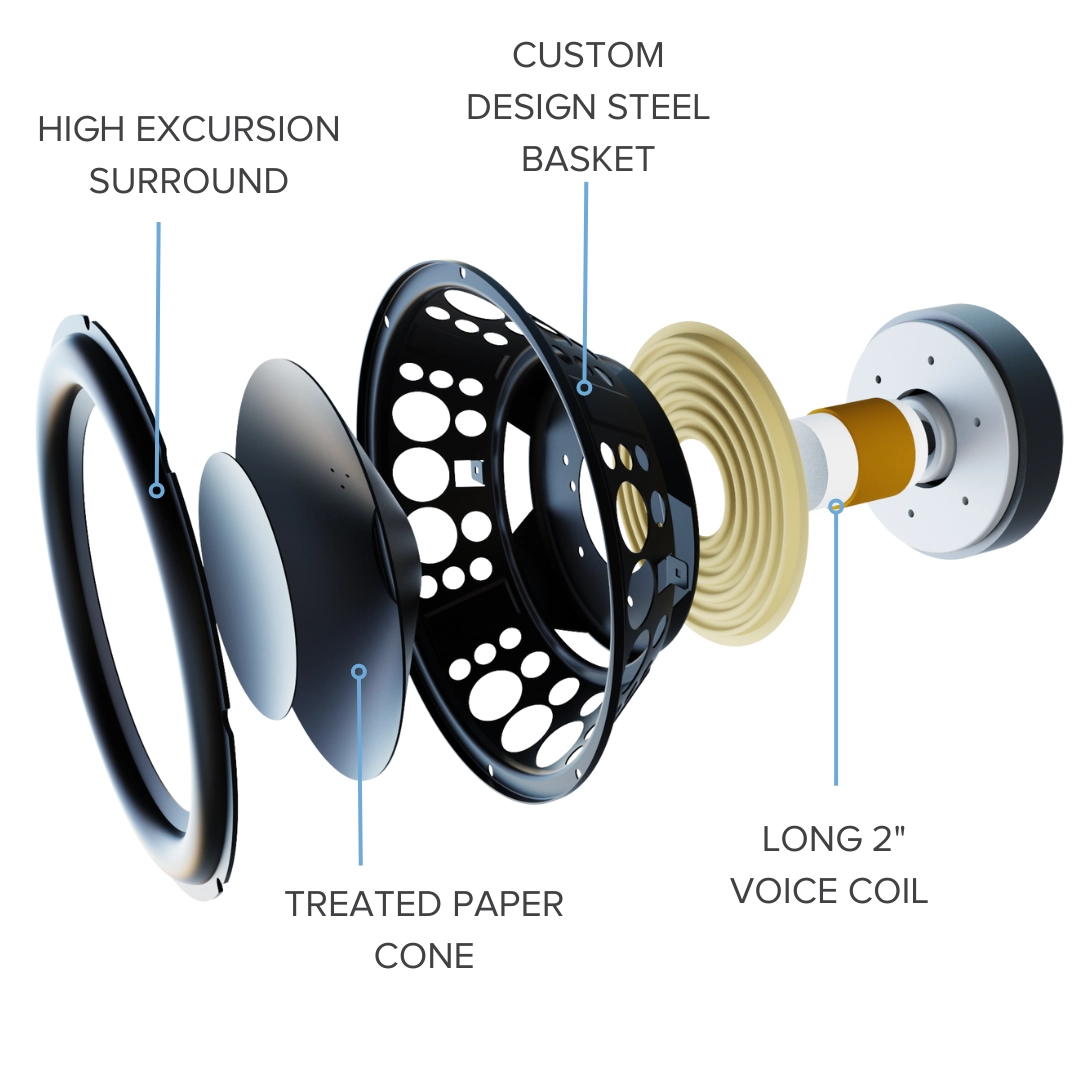
Speakers can wear out or get damaged inside. Loose parts or worn-out cones cause crackling. Testing with different speakers shows if the hardware is faulty. Repair or replace speakers if needed.
Software And Driver Problems
Outdated or corrupt drivers cause sound issues. Update your audio drivers to fix crackling. Check your software settings for sound enhancements that may cause noise. Resetting audio settings can help too.
Quick Checks Before Repair
Before rushing to repair your crackling speakers, try some quick checks. These simple steps can save time and money. They help you find easy fixes that might solve the problem fast.
Inspecting Cables And Connections
Check all cables for damage or loose ends. A frayed wire or loose plug can cause crackling sounds. Make sure every connection is tight and secure. Swap out cables if you see wear or breakage.
Testing Different Audio Sources
Play sound from various devices like phones, computers, or tablets. This helps find if the issue is with your speaker or source. If crackling happens on all devices, the speaker likely has a problem.
Adjusting Volume Levels
Lower the volume on your device and speaker. High volume can cause distortion and crackling. Gradually raise the volume to see if the sound stays clear. Avoid maxing out volume for long periods.
Eliminating Interference
Move speakers away from other electronics like routers or microwaves. These can cause electrical interference and noise. Turn off nearby devices to check if crackling stops. Use shielded cables to reduce interference.
Simple Fixes For Speaker Crackling
Speaker crackling can be annoying and disrupt your listening. Many times, simple fixes solve the problem fast. These solutions do not need special tools or skills.
Try each step carefully. It helps to find the exact cause and fix it without extra cost.
Reconnecting Or Replacing Cables
Loose or damaged cables often cause crackling sounds. Unplug all speaker cables and plug them back tightly. Check for any cuts or bends on the wires. Replace cables that look worn or broken. Use good quality cables for better sound and less interference.
Updating Audio Drivers
Outdated or corrupt audio drivers cause speaker problems. Go to your computer’s device manager and find audio drivers. Download and install the latest version from the manufacturer’s website. Updated drivers improve sound quality and fix bugs causing crackles.
Resetting Audio Settings
Wrong audio settings can create crackling noises. Open your device’s sound settings and reset them to default. Lower the volume and then increase it gradually. Disable sound enhancements that may interfere with output. This refreshes the sound system and clears errors.
Cleaning Speaker Components
Dust and dirt inside speakers affect sound quality. Turn off and unplug your speakers before cleaning. Use a soft brush or compressed air to remove dust from grills and cones. Clean contacts and connectors gently with a dry cloth. Regular cleaning keeps speakers working smoothly and crackle-free.
Credit: elac.com
Advanced Troubleshooting Steps
Advanced troubleshooting helps find hidden problems causing speaker crackling. It dives deeper than basic checks. These steps require care but can save repair costs and time.
Checking Internal Speaker Components
Open your speaker casing carefully. Look for loose wires or damaged parts. Check the speaker cone for tears or dents. Inspect the solder joints for cracks or corrosion. Use a magnifying glass to spot small issues. Tighten any loose screws inside. Replace worn-out foam surrounds if needed. Test the speaker again after fixing.
Using Audio Diagnostic Tools
Audio diagnostic tools can detect sound problems. Use software that tests speaker frequency and distortion. Run a frequency sweep to find irregular noises. Use an oscilloscope to view audio signals. Look for spikes or drops that cause crackling. Adjust equalizer settings based on test results. These tools help identify faults not visible to the eye.
Consulting Manufacturer Support
Contact the speaker maker’s customer service. Provide model number and issue details. They can offer specific repair advice or firmware updates. Ask about warranty coverage for repairs. Some manufacturers provide step-by-step guides. Follow their instructions carefully to avoid voiding warranty. Manufacturer support can offer solutions tailored to your device.
Preventing Future Speaker Issues
Preventing future speaker issues is key to enjoying clear sound for a long time. Small actions can stop crackling sounds before they start. Protect your speakers with smart habits and care.
Proper Speaker Placement
Place speakers on stable surfaces. Avoid spots near walls or corners. These areas can cause sound distortion. Keep speakers away from heat or moisture. Proper placement reduces stress on speaker parts.
Regular Maintenance Tips
Clean speakers regularly using a soft cloth. Dust and dirt can cause crackling sounds. Check wires and connections often. Replace damaged cables to keep sound clear. Store speakers in a dry place when not in use.
Avoiding Overloading The System
Do not play music at maximum volume all the time. Loud sounds can damage speaker components. Use volume levels within safe limits. Overloading creates distortion and crackling noises. Protect speakers by listening at moderate levels.
Credit: elac.com

Credit: www.jazzymobiles.com.au
Frequently Asked Questions
Why Do My Speakers Crackle When Playing Music?
Speakers crackle due to loose connections, damaged wires, or interference. Dirt on speaker terminals or audio jacks can also cause crackling sounds. Checking cables and cleaning contacts often resolves this issue quickly.
Can Speaker Crackling Indicate Hardware Damage?
Yes, persistent crackling may signal damaged speaker cones or worn-out components. Ignoring this can worsen sound quality. It’s best to inspect or replace faulty parts promptly for clear audio.
How To Fix Crackling Speakers At Home?
Start by tightening all connections and cleaning audio jacks. Test different cables and devices to isolate the issue. If crackling persists, consider updating drivers or consulting a professional technician.
Does Software Affect Speaker Crackling Issues?
Outdated or corrupted audio drivers can cause crackling sounds. Updating or reinstalling drivers often fixes these problems. Always keep your device’s software current for optimal audio performance.
Conclusion
Speaker crackling can stem from many common issues. Loose wires, dirt, or poor connections often cause noise. Regular checks and cleaning help keep sound clear. Using quality cables and avoiding overloads protect your speakers. Small fixes often stop crackling quickly and easily.
Pay attention to your equipment’s condition and settings. Clear sound makes listening more enjoyable and less frustrating. Take simple steps today to enjoy better audio tomorrow.
As an Amazon Associate, I earn from qualifying purchases.

